
The 2026 Small Business Website Checklist
We’ve audited 27 small business websites this year so far from outreach requests. Most were leaving 30 to 50 percent of their potential reach on the table for reasons their owners had no way to spot.
The reasons rarely have anything to do with marketing strategy; usually it’s the technical foundations that decay and AI search engines that read your site differently than humans do. Every small business website checklist you’ll find online either gets the basics right and skips the AI layer entirely, or covers AI search at a level that assumes you’re a developer. This one tries to do both.
If you’re a small business owner with a passing interest in SEO who wants to know whether your site is actually working in 2026, this is for you. The owner-language summary is in the first half, the full technical checklist is in the second, and the AI layer (which is genuinely new and almost nobody else is covering it for small business) sits in between.
The 10 Things Most Small Business Websites Get Wrong
These are the patterns we see in almost every initial audit, regardless of platform or industry. Ranked by how much revenue they typically cost.
1. Google can’t tell what your business actually does.
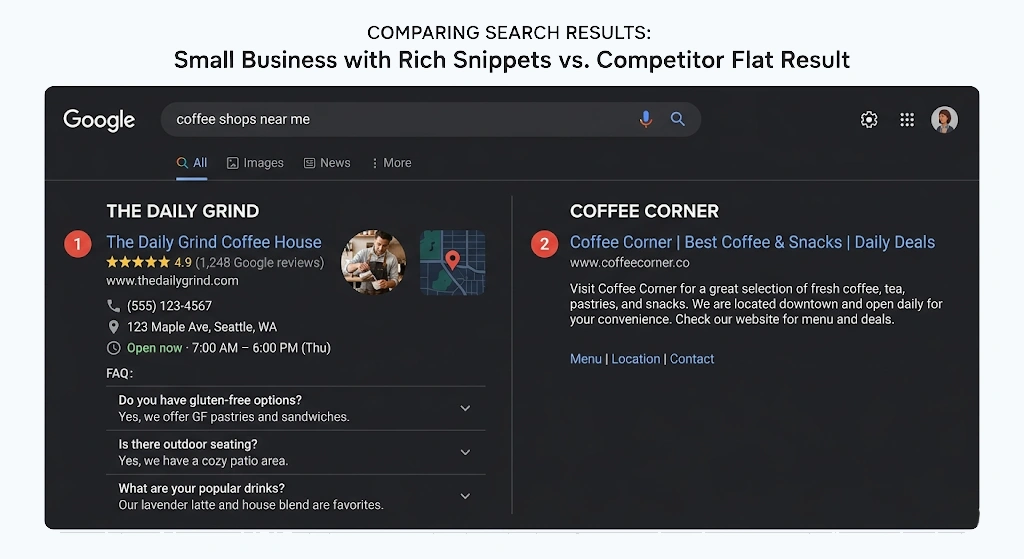
Structured data (JSON-LD) is the layer of invisible code that tells search engines (and AI tools) what your business is, what you sell, your hours, your reviews, and your prices. Almost every small business site we audit is missing it or has it broken. The result: competitors with the same products outrank you because Google can read their sites and not yours. Wix and Shopify auto-generate some of this, but rarely correctly.
2. Your title tags and meta descriptions are getting cut off in search results.
Google shows about 60 characters of your title tag and around 155 characters of your meta description before it cuts off the rest. When a title runs long, the part that disappears is usually the part that would have made someone click. When a description runs long, the call to action is the first thing to go. Give every page a unique title near 60 characters and a unique description near 155, with the words that matter most up front.
3. You have broken internal links you don’t know about.
When we first audited one client’s site, they had 71 pages with broken internal links. We got it to 0 in a few days. Every broken link is a dead end for a customer and a signal to Google that your site isn’t maintained.
4. Your sitemap includes pages that shouldn’t be there.
Admin pages, thank-you pages, draft pages, “copy-of” pages from when someone tried to duplicate something. Search engines waste crawl budget on these and your site gets less attention as a result. We’ve found admin pages, contact form confirmation pages, and abandoned drafts in client sitemaps on almost every audit.
5. AI assistants can’t read your site, so they recommend competitors.
When someone asks ChatGPT or Perplexity “best halal meal prep in San Jose” or “top wedding photographers near me,” those tools read sites to decide who to recommend. Almost no small business site is set up to be read cleanly. This is the AI agent layer the next section is about.
6. Your phone number isn’t clickable on mobile.
Sixty-something percent of your traffic is on a phone. If your phone number is rendered as plain text instead of a tel: link, half the people who would have called you don’t. This one takes five minutes to fix, and we still see it on most sites.
7. Your hosting setup is more embarrassing than you think.
Slow load times, missing security headers, expired SSL certificates that auto-renewed badly, sites that crash on real mobile networks. Most owners don’t know because they only test on fast home WiFi. We see this on every Wix and shared-hosting site we audit.
8. Your analytics aren’t actually tracking what makes you money.
Google Analytics that was set up once and never configured for conversions. Or Wix’s surface-level stats that won’t tell you which page actually drove a sale. If you can’t see what’s working, you can’t repeat it. We wrote a whole post about the two GA4 settings that inflate lead counts because we kept seeing it on client audits.
9. You don’t have a Google Business Profile (or yours is incomplete).
This is the single highest-leverage thing for a local business, and we still see attorneys, restaurants, and service businesses without it claimed. If you have one, the listing is probably missing photos, services, posts, and the right primary owner.
10. You don’t own the accounts your business depends on.
The domain, the hosting, the ad accounts, the analytics, the customer list. We did a whole separate post on what is vendor lock-in and how to avoid it, but it belongs on the list because no amount of SEO matters if the agency or platform that holds your stuff goes away.
The AI Agent Layer (The Part Most Checklists Skip)
Most SEO advice was written for a world where humans typed into Google, but now that world is half gone. The new visitors to your website are AI agents acting on behalf of humans, and most small business sites are invisible to them.
When someone asks Claude or ChatGPT “what’s the best dentist near me,” the AI doesn’t search Google the way you would. It reads a curated set of sources, picks the ones that answer cleanly, and recommends them. If your site isn’t on that list, you don’t exist for that customer.
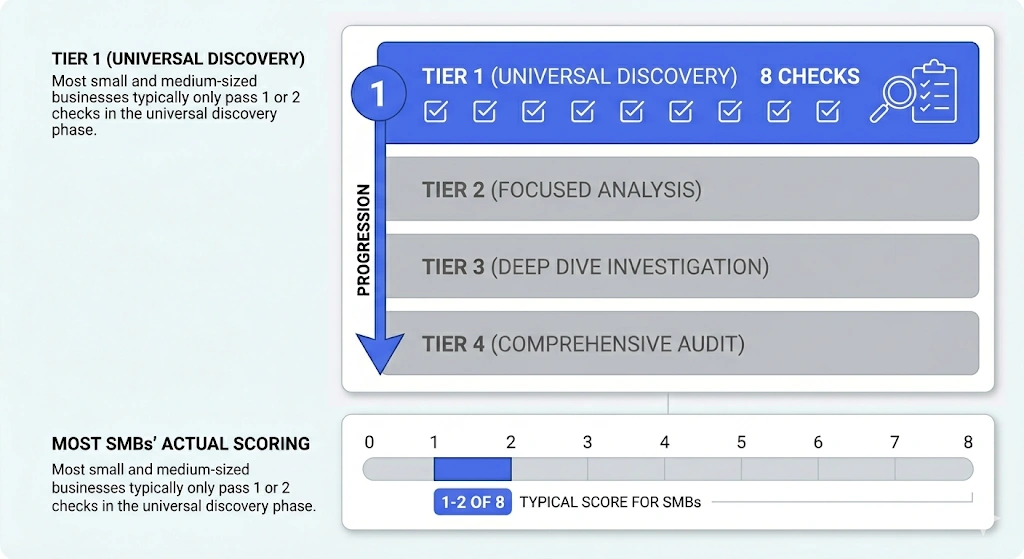
There are 16 technical signals that determine whether AI agents can find and read your site. We grouped them into four tiers when we ran our Fortune 500 AI agent readiness study, and the finding was bluntly that zero of 500 enterprise sites passed more than 5 of the 8 universal-tier checks. The average was 25%. If that’s where the country’s most-resourced companies sit, you can imagine where Main Street is.
For most small businesses, only the first tier matters right now.
Tier 1: Universal Discovery (8 checks every site should pass)
robots.txtpresent and not blocking the wrong thingssitemap.xmlpresent and accurate- Link Headers (RFC 8288) so agents can discover related resources
- Markdown for Agents (a clean version of your content agents can parse)
- AI Bot Rules, explicit allow or disallow for GPTBot, ClaudeBot, PerplexityBot
- Content Signals (the new directive that tells AI what you’re okay with them doing)
llms.txt, the emerging standard for telling AI what your site is and where the important pages live- Agent Skills Index, a manifest of what an agent can do on your behalf at your site
Most small business sites score 1 or 2 out of 8 on this. The fix for almost all of them is a single afternoon of configuration. The companies that ship these in the next six months are going to own their category in AI search for years.
Tier 2: API and Auth Discovery (3 checks). Only relevant if your site has a customer login or an API. Most small business marketing sites can skip this.
Tier 3: Advanced Discovery (2 checks). Forward-leaning, agent-native standards. Worth tracking but not table stakes yet.
Tier 4: Agent UX (3 checks). Can an agent actually click around and fill out your forms once it arrives? This is mostly a side effect of good accessibility work, which most modern sites already do reasonably well.
If you only do one thing from this whole post, get Tier 1 of the AI agent layer in shape on your site. We have not yet audited a small business site that passes more than 3 of the 8 Tier 1 checks on the first scan. Cloudflare’s free public scanner at isitagentready.com is a reasonable starting point to see where you stand.
The Full Technical Checklist
This is the long version of the small business website checklist. Skim it if you’re an owner, dig in if you’re technical or working with someone who is.
Foundations
- HTTPS with a valid, non-expiring SSL certificate
- Mobile-responsive with a viewport that allows zoom (some sites disable zoom for “design,” which fails accessibility)
- Core Web Vitals: LCP under 2.5 seconds, CLS under 0.1, INP under 200 milliseconds on real mobile
- Page size kept reasonable (we look for sites under 3 MB on the homepage)
- Images optimized through a build-time pipeline, not just whatever the CMS uploaded
Crawlability and Indexability
sitemap.xmlexists, is referenced inrobots.txt, and excludes utility pages (admin, thank-you, drafts, “copy-of” pages)robots.txtexists and doesn’t accidentally block important sectionsContent-Signaldirective inrobots.txtset per your AI usage policy- Canonical URLs on every page, consistent trailing slash convention
- Correct use of
noindexon admin, search, thank-you, and other utility pages - No duplicate content across product variants, category pages, or printer-friendly versions
On-Page SEO
- Unique title tag per page, around 60 characters, the primary keyword early
- Unique meta description per page, around 155 characters, with a soft call to action
- One H1 per page, unique, descriptive
- Clean H2/H3 hierarchy (no skipping levels for styling)
- Alt text on every meaningful image (decorative images get empty
alt="") - Internal links use descriptive anchor text (“our SEO audit process” beats “click here”)
- External links open with
target="_blank"link. You can addrel="nofollow"on external links you explicitly do not endorse.
Structured Data (JSON-LD)
- Organization or LocalBusiness schema on the homepage. Service businesses use LocalBusiness with NAP (name, address, phone) matching Google Business Profile exactly
- FAQPage on FAQ-style content
- BlogPosting on every blog post with headline, image, dates, author
- BreadcrumbList for blog and category navigation
- Product schema on every product page (price, availability, reviews) for ecommerce
- Validated against Google’s Rich Results Test before deploying
Social and Open Graph
- OG tags on every page: title, description, image, url, type, site_name
og:typeset toarticlefor blog posts,websitefor everything else- X / Twitter Card tags (
summary_large_imageon most pages) - Default OG image fallback (1200×630) when a page lacks a specific one
article:published_timeandarticle:tagon blog posts
Analytics and Tracking
- GA4 properly configured with goals, conversions, and event tracking. Use this if cookie banner UX isn’t a concern for your audience
- GoatCounter as a privacy-friendly alternative if you don’t want a cookie banner. Lightweight, no PII, no banner needed
- Google Search Console verified, sitemap submitted, performance reports being read
- Bing Webmaster Tools verified and sitemap submitted (Bing is the index that powers ChatGPT’s web tool)
- Microsoft Clarity to view user behavior in real time with recordings, heat maps, and more (free HotJar basically)
- IndexNow ping on every build so search engines see new content the day it ships
- Conversion tracking that actually maps to revenue, not just page views
Local and Business Presence
- Google Business Profile claimed, primary owner is your business (not your agency), all categories and services filled, hours accurate, photos current, posts active
- Bing Places for Business claimed and complete
- Apple Maps Business Connect claimed
- NAP consistent across every listing and your site footer
- Top directories for your industry claimed and current (Yelp, BBB, industry-specific where appropriate)
- Username consistency across your social and directory profiles, with a fallback handle reserved for places your primary isn’t available
AI Agent Readiness (Tier 1)
This is the layer most checklists don’t cover. Each of these is a small file or directive that costs almost nothing to deploy.
robots.txtallowlists for AI crawlers (GPTBot, ClaudeBot, PerplexityBot, Google-Extended) with explicit allow or disallow decisions per botContent-Signaldirective set per your policy (search, ai-input, ai-train)llms.txtfile present and accurate (lists your key pages, recent posts, brand description)- Markdown variants of your important pages reachable at predictable URLs
- Link Headers (RFC 8288) exposing related resources
- Agent Skills Index file telling agents what they can do at your domain
- Semantic HTML with
<button>and<a>(not<div onclick>) for interactive elements - Form inputs linked to proper
<label for="...">elements witharia-labelwhere needed
For the deeper version of the AI search story, our generative engine optimization practitioner guide covers how to actually earn citations in ChatGPT, Perplexity, and Google AI Overviews once the basics are in place.
What Semrush and Most Audit Tools Will Also Flag
Semrush will catch most of the technical foundations above and surface them in three categories: errors (must fix), warnings (should fix), notices (nice to know). Common offenders:
- 4xx errors (broken pages)
- Duplicate titles or content
- Broken internal links
- Title elements too long or too short
- Missing meta descriptions
- Low text-to-HTML ratio (page bloated with code, light on content)
- Invalid
robots.txtor sitemap format - Pages with only one internal link (orphaned-ish)
- Permanent redirect chains
llms.txtnot found
A clean site should run under 50 errors and under 100 warnings on a thorough Semrush crawl of 100-plus pages. Most small business sites we audit start at 500-plus errors and 400-plus warnings.
Want this run on your own site? We audit small business websites against the same 50-plus checks and the 8-check Universal AI agent readiness tier, then ship the fixes that see the most uplift.
View Case StudiesHow We Use This When We Audit a Client’s Site
Here’s what the small business website checklist looks like applied to real client work. Two recent examples, both real, both verifiable on our case studies page.
Gainz and Shreds Meal Prep (San Jose, CA). Andrew Aguilar runs a halal meal prep business and was stuck on Wix paying rising platform fees, with a maintenance contractor quoting him a rebuild at nearly double our number plus a monthly retainer. We migrated him to a custom Astro site on Netlify with a Git-backed CMS, integrated his Toast ordering, set up multi-location routing for his San Jose and Sunnyvale shops, rebuilt his Google Reviews widget, and migrated DNS and email off Wix.
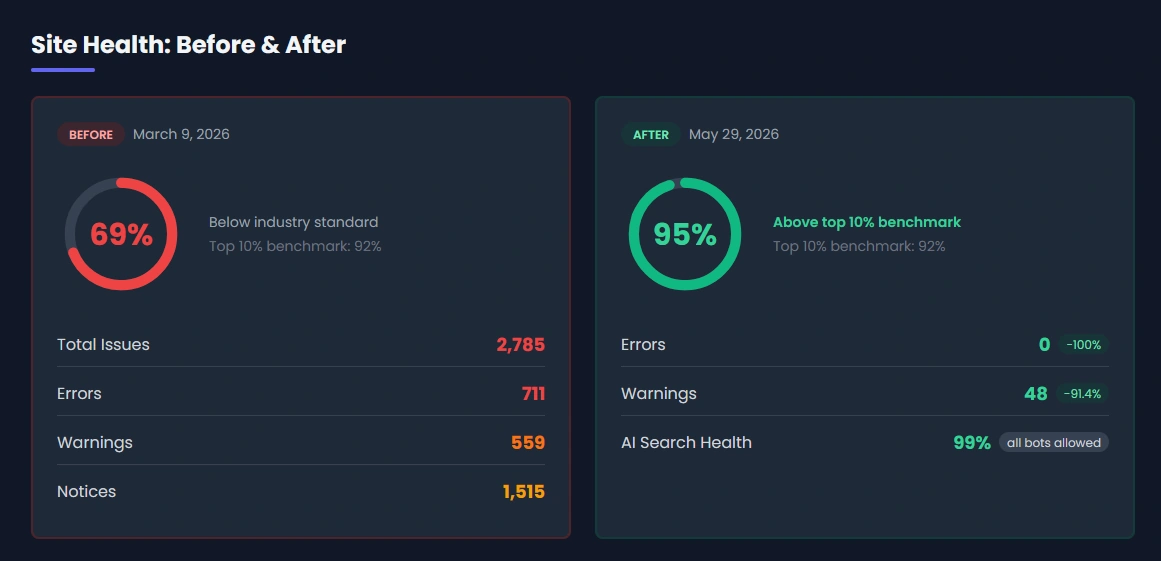
On the old Wix site, Semrush rated his site health at 69%, with 711 errors and AI search visibility near the floor. The new site we built runs at 95% site health with zero errors and AI Search Health at 99%, which is three points above the top-10% industry benchmark of 92% and puts Gainz and Shreds among the small business sites that AI search engines can actually read cleanly.
PageSpeed went from 47 to 99, and the site now scores a perfect 100 on SEO. Andrew owns everything, pays $0 a month for hosting, and can easily edit the site himself. Full case study here.
An Established Apparel Brand. This one came to us with a Shopify store buried under 97,000-plus technical issues across 4,100-plus pages. The starting state: 10,738 critical errors, 39,049 warnings, 72% site health (the small-business-Shopify floor), and zero AI search visibility.
We rewrote 1,934 truncated title tags, resolved 547 instances of duplicate content, eliminated 4,080 external 403 errors, and deployed proper Product, Breadcrumb, and FAQ schema across the catalog. We also deployed llms.txt and structured data tuned for AI search.
After the cleanup, the store sat at 8 errors and 14 warnings, with site health at 93% (above the top-10% industry benchmark) and AI search readiness at 92%. In the months that followed, it produced $160,697 in sales, a 52% lift over the prior period, with a 38% bump in conversion rate. Full case study here.
These are the patterns. The technical work isn’t glamorous, but it compounds in ways that show up in revenue.
Three Things to Do This Week
If you’ve read this whole small business website checklist and want to do something with it, here’s the minimum set worth your Saturday morning.
- Run a free Semrush or ahrefs crawl on your own site (the free tiers are pretty generous for one site). Look at the errors list. Anything with a count over 5 is worth fixing this month.
- Open
yoursite.com/robots.txtandyoursite.com/llms.txtin your browser. If either returns a 404 or looks like a default file your platform generated, that’s your starting point. The llms.txt file alone takes about an hour to write and dramatically changes how AI tools cite you. - Check
yoursite.com/sitemap.xmlfor anything that shouldn’t be public. Admin pages, thank-you pages, draft pages. If they’re there, they’re costing you crawl budget.
Those three checks take 30 minutes total and tell you where 80% of your problems live.
Want This Done For You?
We audit and build websites constantly. If you read this and the words “I should know what’s on my sitemap” felt like a personal attack, send us your URL and we’ll point out the top three priorities, free, within a few business days. Or if you want the full audit, the same report we delivered to Gainz and Shreds and the apparel brand above, reach out through our contact form.
The work isn’t glamorous, but it compounds. The companies that ship the basics in the next six months are going to own their categories in AI search for years.
Frequently Asked Questions
What Should Be on a Small Business Website Checklist in 2026?
A small business website checklist in 2026 has to cover three layers: the technical foundations (HTTPS, Core Web Vitals, structured data, clean sitemap, proper canonical tags), the marketing layer (on-page SEO, Open Graph tags, Google Business Profile, conversion tracking that actually maps to revenue), and the AI agent readiness layer (robots.txt with explicit AI bot rules, llms.txt, Content-Signal directives, and structured markdown variants of your important pages). Most checklists you’ll find online stop at the first two and leave the AI layer entirely uncovered, which is increasingly where new customers find you.
How Do I Know if My Small Business Website Is Working?
You can do a 30-minute self-audit by running a free Semrush crawl on your own site (their free tier covers up to 100 pages a month), opening your own robots.txt and llms.txt files in a browser to see if they exist, and checking your sitemap.xml for utility pages that shouldn’t be public. Together those three checks surface roughly 80% of the technical problems we typically find on a client audit. If you want a deeper read, conversion tracking, Google Business Profile completeness, and AI agent readiness are the next three layers to look at.
What Is AI Agent Readiness and Why Does It Matter for a Small Business?
AI agent readiness is whether large language models like ChatGPT, Perplexity, Claude, and Google AI Overviews can read your site cleanly when a customer asks them for a recommendation. There are 16 technical signals across four tiers, and the 8 in the first tier (Universal Discovery) are the ones every business should pass. Most small business sites score 1 or 2 of 8 on a first scan. As more buying journeys start in AI assistants rather than Google, sites that fail these checks effectively disappear from those recommendations.
What Is the Difference Between SEO and AI Search Optimization?
Traditional SEO optimizes for human search behavior on Google: keyword targeting, backlinks, on-page content, and Core Web Vitals. AI search optimization (sometimes called generative engine optimization or GEO) optimizes for how large language models read, summarize, and cite sources when answering a user’s question. The technical foundations overlap (clean structured data, good content, fast load times), but AI search adds a layer of agent-specific signals like llms.txt, Content-Signal directives, and explicit AI bot allowlists in robots.txt that traditional SEO doesn’t address.
How Often Should I Run a Website Audit?
Run a full technical audit at least twice a year, with monthly spot checks on your Semrush error count and Google Search Console coverage report. Anytime you migrate platforms, redesign your site, change your domain, or add a major content section is also a trigger for an audit. The reason is that most regressions slip in unnoticed: a plugin updates and breaks schema, a developer pushes a change that accidentally noindexes a section, or a CMS update changes how images are served. Catching these inside 30 days is much cheaper than catching them inside six months.
Can I Do This Myself Without Hiring an Agency?
Most of the items in the technical checklist above are doable by a small business owner with a Saturday morning and a willingness to look up unfamiliar terms. The 30-minute trio in the “Three Things to Do This Week” section will tell you where the highest-impact fixes live. Where outside help pays off is on structured data (JSON-LD is finicky and validates strictly), AI agent readiness (the standards are new and most platforms haven’t shipped them yet), and any platform migration where you’re moving off Wix, Squarespace, Shopify, or another locked-in CMS onto something portable. Those are the spots where doing it right the first time saves you years of cleanup.