
Most founders check their own website the same way every time. Load the page, poke at the meta tags, run it through a checker or two, maybe paste a URL into a free tool to see what is broken. That works, but you are the one clicking. And more of the web is being read by AI agents acting on your behalf, agents that cannot open your favorite browser tab and eyeball the result.
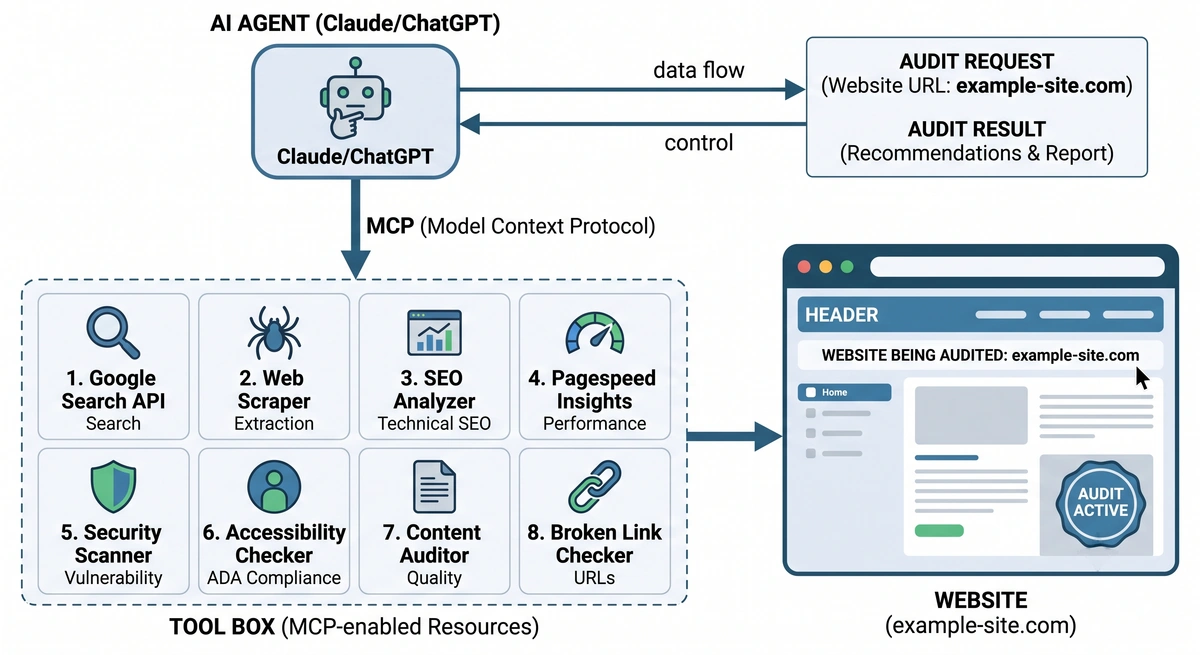
So we built an MCP server for SEO and AI visibility. It takes the free tools we already give people and hands them straight to the agent, so Claude, Cursor, or ChatGPT can audit any site on its own: detect the tech stack, trace redirects, check which AI crawlers a site blocks, validate structured data, and more. It is free, open source, and needs no key. You add one URL and your agent can run the checks itself.
This is the natural next step from AgentGrade, our tool that grades how well AI agents can read, trust, and cite a page. We grade how visible your site is to AI. Now the tools themselves work for the AI.
What an MCP Server Actually Is
MCP stands for Model Context Protocol. Anthropic announced it in November 2024 as, in their words, “a new standard for connecting AI assistants to the systems where data lives.” Through 2025 it stopped being one company’s idea and became the common way agents connect to outside tools, with OpenAI and Google both adopting it. If you want the technical version, the protocol has its own home and spec.
The plain version: an MCP server is a bundle of tools you hand to an AI agent. Once it is connected, the agent can call those tools during a conversation, the same way you might reach for a calculator mid-sentence. You are not copying output back and forth. The agent asks the tool a question, gets a structured answer, and keeps going.
An MCP server for SEO, then, is that same idea pointed at the checks you would otherwise run by hand: what a site is built with, how it redirects, whether search and AI systems can read it. People search for an SEO MCP, or an MCP for SEO, and mean this same thing. Instead of you being the browser, the agent is.
Why We Built an MCP Server for SEO
The web is shifting from something people browse to something agents read for them. The numbers are not subtle. Cloudflare, which sees a large slice of global traffic, found that OpenAI’s GPTBot went from about 5% to 30% of AI crawler traffic between May 2024 and May 2025. The machines reading your pages are a bigger and bigger share of who reads them at all.
We have been writing about this shift for a while, from our practitioner guide to generative engine optimization to a look at how the Fortune 500 scores on AI agent readiness. The pattern is consistent: most sites were built for human eyes and Google’s crawler, and they leave money on the table with the newer readers.
Here is the gap we kept hitting. People use our free tools to check a site. Agents cannot. If an agent is helping you fix your site, or a developer is using Claude to ship it, the agent has to guess or ask you to go run the check and paste it back. That is a silly bottleneck. An MCP server for SEO closes it, so the same agent doing the work can also verify the work.
The Twelve Tools Your Agent Can Call
Each tool takes a URL or a domain, and every one is a read-only public lookup. Nothing writes to your site.
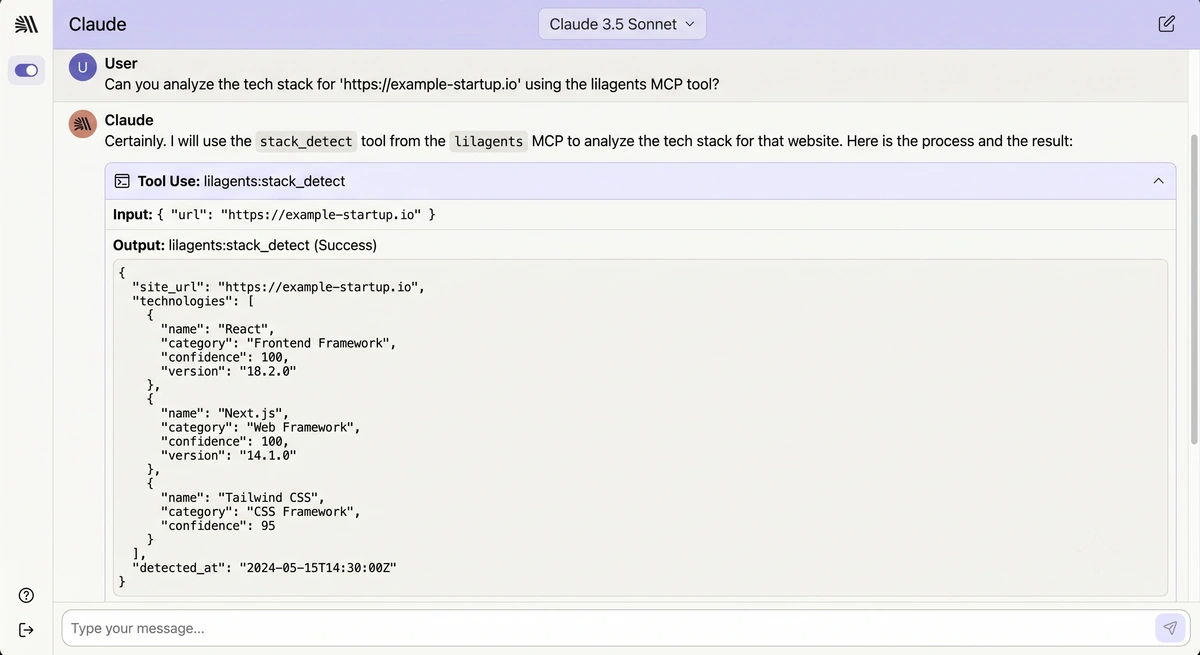
- stack_detect: fingerprints the CMS, framework, hosting, backend, and marketing tech behind a URL, flags AI website builders, and pulls domain registration and the Ahrefs Domain Rating.
- trace_redirects: follows every redirect hop and reports each status code and destination, so broken or sneaky chains show up fast.
- dns_snapshot: returns a full DNS picture (A, AAAA, MX, TXT, NS, CNAME, SOA, CAA) over DNS-over-HTTPS, handy for migrations and deliverability.
- check_headers: reports which baseline security headers a page sets and which it is missing.
- check_robots: shows which major AI crawlers your robots.txt allows or blocks (GPTBot, ClaudeBot, PerplexityBot, Google-Extended, and more), and whether an llms.txt exists.
- check_indexability: reads the canonical link, meta robots tag, and X-Robots-Tag header to say whether a page is indexable.
- validate_schema: extracts every JSON-LD block, validates that each parses, and lists the schema.org types it finds.
- domain_rating: the Ahrefs Domain Rating from 0 to 100, returned with its attribution.
- dmarc_check: the DMARC record and its policy plus the SPF record for a domain, for deliverability and spoofing checks.
- sitemap_check: finds the sitemap and reports whether it is an index or a urlset, how many entries it has, and how many carry a lastmod.
- og_preview: reads the Open Graph and Twitter Card tags, the title and image a social or AI preview would show.
- alt_audit: audits a page’s images for descriptive, empty, and missing alt text.
If that list looks familiar, it should. These are the engines behind our free tools and behind AgentGrade, packaged so an agent can call them without a human in the loop.
How to Add It in Under a Minute
There are two ways in, depending on your client.
For Claude.ai or ChatGPT, add the remote server as a custom connector. No install, no key:
https://mcp.lilagents.comFor Claude Code, one line does it:
claude mcp add --transport http lilagents https://mcp.lilagents.comPrefer to run it locally over stdio, in Claude Desktop, Cursor, or Claude Code? Point the client at the npm package:
npx -y @lilagents/mcpFull setup snippets for each client live on the MCP page, and the whole thing is browsable on GitHub if you want to read every line before you trust it.
Why It Is Free and Open Source
We could have kept this internal, or gated it behind a login. We did the opposite, because gating your own free tools behind a wall you control is exactly the kind of lock-in we tell founders to run from. If you have read our take on vendor lock-in and how to avoid it, this is the same principle applied to us.
The server is MIT licensed and public. You can run the remote endpoint, or install the package and run it on your own machine, or fork it and change it. The tool handlers are the same whether you call the hosted server or the local one, so there is no bait-and-switch between the free version and a “real” version. There is one version, and it is yours to use.
That fits how we build everything else. Our generative engine optimization work ships as things you own, our sites run on portable stacks, and the rest of our free tools are open source too. An MCP server for SEO that you cannot inspect or self-host would have been off-brand.
What It Looks Like In Practice
Once it is connected, you just ask. Real prompts that work today:
- “Use lilagents to detect what stripe.com is built with.”
- “Which AI crawlers does my site block in robots.txt?”
- “Trace the redirects on this shortened link and tell me where it lands.”
- “Is this page indexable, and does it have valid JSON-LD?”
The agent picks the right tool, runs it against the live site, and folds the answer into whatever it was already helping you with. If it is writing your schema markup, it can validate its own output. If it is fixing your robots.txt, it can confirm GPTBot and ClaudeBot are allowed afterward. The loop closes without you leaving the chat.
This is the same “agents plus a human who knows what to ask” pattern we described in AI workflow automation and the human layer. The agent does the fetching and parsing. You bring the judgment about what to fix.
We build sites and systems to be found by people and by the agents reading on their behalf, and you own all of it. If you want a growth department that ships that way, let's talk.
Talk to usFrequently Asked Questions
What is an MCP server for SEO?
It is a Model Context Protocol server that gives an AI agent a set of SEO and site-audit tools it can call directly. Instead of a person running a checker and pasting the results into a chat, the agent runs the check itself and uses the answer. The lilAgents version covers tech-stack detection, redirects, DNS, security headers, AI-crawler access, indexability, structured data, Domain Rating, email authentication (DMARC and SPF), sitemaps, Open Graph tags, and image alt text.
What is MCP in SEO?
MCP in SEO means using the Model Context Protocol to give an AI agent SEO tools it can call, so it can check a site’s stack, robots.txt, structured data, or headers during a conversation instead of asking you to go run each check. The lilAgents MCP is one example of an SEO MCP server, and you can add it to Claude, Cursor, or ChatGPT for free.
Do I need to install anything?
No, if you use the remote endpoint. Add https://mcp.lilagents.com as a custom connector in Claude.ai or ChatGPT and you are done. If you would rather run it on your own machine, the npm package installs with a single npx command and works in Claude Desktop, Cursor, and Claude Code.
Is the lilAgents MCP free?
Yes. It is free to use, open source under the MIT license, and needs no API key. You can call the hosted server, self-host the package, or fork the code. There is no paid tier hiding a better version.
Which AI clients support it?
Any client that speaks the Model Context Protocol. That includes Claude.ai and Claude Desktop, Claude Code, Cursor, ChatGPT with remote MCP connectors, and a growing list of others. The remote URL works for clients that support remote servers, and the npm package covers local stdio clients.
How is this different from AgentGrade?
AgentGrade is a graded report you read as a person: paste a URL, get a letter grade on how visible the page is to AI. The MCP server is the toolbox behind that idea, exposed so your own agent can run the individual checks whenever it needs them. One is a scorecard for you, the other is a set of tools for your agent.
Can an agent change my site with these tools?
No. Every tool is a read-only public lookup. The server fetches and inspects, and it never writes, edits, or logs into anything. It is safe to point at any site, including one you do not own.