Who Owns Your Website Source Code? How to Check
Hit Ctrl+U on your homepage and you are looking at website source code. Whether it is your website source code is a separate question, and the two answers have almost nothing to do with each other. The markup your browser downloads will tell you what platform built the site and often which agency did the building, and it will tell you nothing about whether you could rebuild that site somewhere else next month if you had to.
We run this check on prospect sites before every discovery call and it takes about two minutes. More often than not, the business turns out to be renting something it is convinced it bought.
The Three Layers People Call Website Source Code
When someone asks for the source code for a website, they usually mean one of three things without realizing there is a difference, and that difference decides everything downstream.
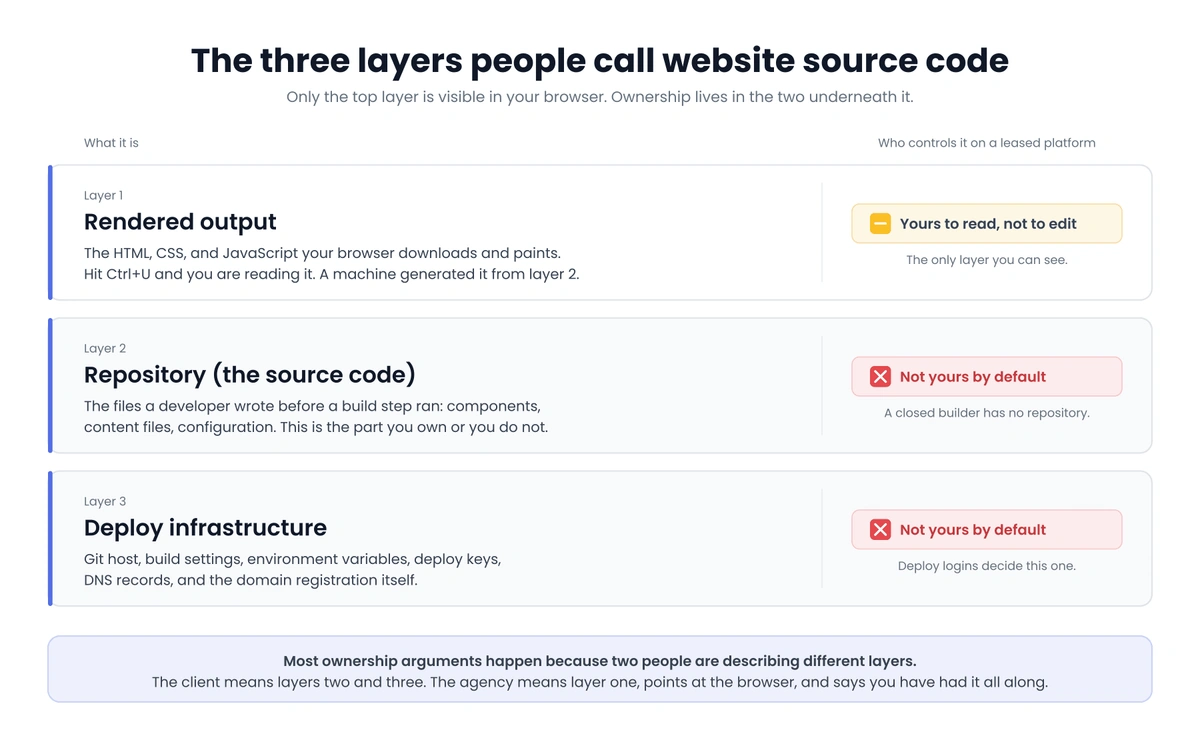
Layer one is the rendered output: the HTML, CSS, and JavaScript your browser downloads and paints. Anyone with a keyboard can read it, and in any practical sense it is not yours, since a machine generated it out of something else.
Layer two is that something else, the files a developer actually wrote before a build step compiled them into layer one. On a modern site that means a repository full of components, content files, and configuration. This is the website source code you either own or you do not.
Layer three is everything that turns layer two into a live site: the Git host, the build settings, environment variables, deploy keys, DNS records, and the domain registration itself. You can own a repository outright and still be unable to publish a single change, because someone else holds the deploy credentials. We once watched a company sit on a finished redesign for six weeks while it waited on a former contractor to hand over one hosting login.
Most ownership arguments happen because two people are describing two different layers. The client means layers two and three, while the agency means layer one, points at the browser, and says you have had it the whole time.
How to View Website Source Code in Your Browser
Start with the easy part. In Firefox or Chrome, Ctrl+U on Windows or Cmd+Option+U on Mac opens the raw markup for the page you are on, and typing view-source: in front of any URL gets you to the same place. Right-click and “View Page Source” works too. If the site renders everything in JavaScript, that raw view will look nearly empty, so press F12 and use the Elements panel instead, which shows the live DOM after the scripts have run.
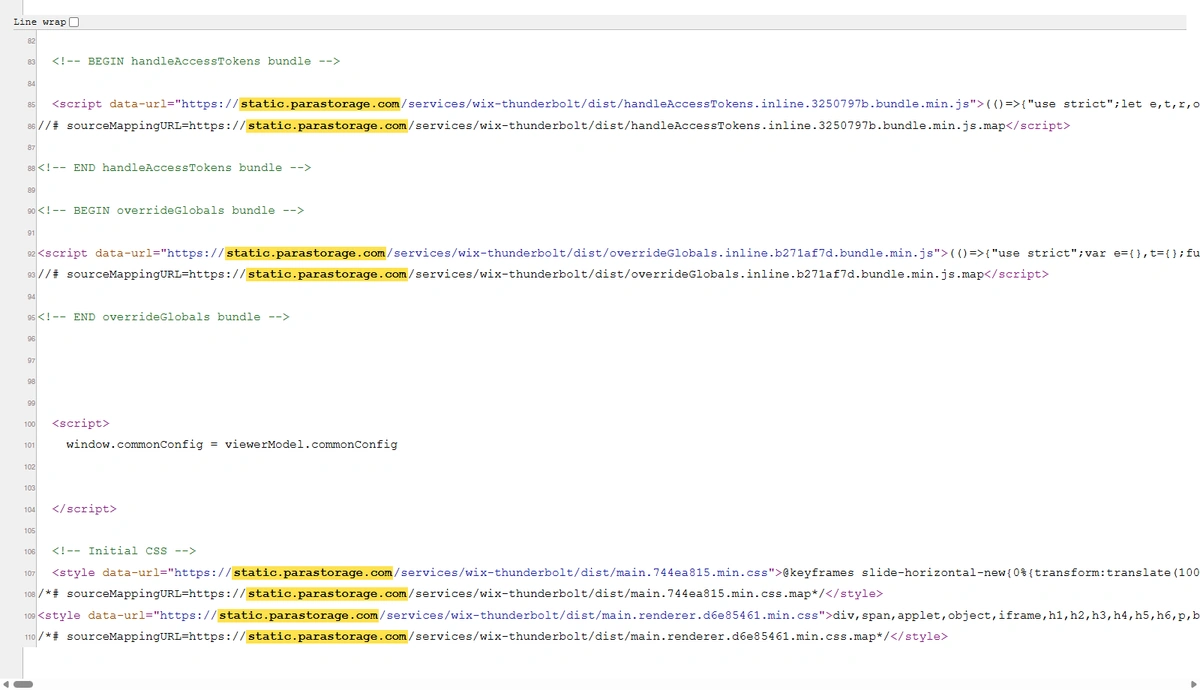
Once you are staring at the website source code, you are looking for two kinds of evidence. The first is a <meta name="generator"> tag near the top, since Wix, WordPress, and Astro all announce themselves there, though stripping that tag out takes about four seconds and plenty of shops do it. The second is asset URLs, which are much harder to fake because the files genuinely have to load from somewhere.
| What you find in the source | What built the site |
|---|---|
static.parastorage.com | Wix |
static1.squarespace.com | Squarespace |
cdn.prod.website-files.com, data-wf-page | Webflow |
/wp-content/themes/ | WordPress |
cdn.shopify.com | Shopify |
/_next/static/ | Next.js |
data-astro-cid- | Astro |
That one scan sorts you into two buckets, and the sort decides everything after it.
What the Platform Fingerprint Says About Ownership
If the website source code comes back Wix, Squarespace, or some proprietary agency platform, there is no repository to own, and your ownership question is already settled, just not in your favor. Wix says as much in its own documentation: the site has to run on Wix servers because the platform is SaaS built on proprietary technology, so hosting a Wix site anywhere else is off the table. Squarespace is similarly specific about the gap in its site export article, where layout pages, one blog page with its posts, text blocks, and image blocks come out, while page-specific headers and footers, product blocks, video blocks, drafts, style settings, and custom CSS all stay behind. We went deeper on what actually survives a Squarespace export if you are weighing that move right now.
None of that makes those platforms a mistake for every business, and there is a real case for staying on one that we will get to. It does mean the ownership conversation ends before it starts.
If the fingerprint comes back WordPress, Shopify, Astro, Next, Eleventy, or anything else that builds from files, then a repository exists somewhere and the only question left is whose account it is sitting in. For a sense of how often each case comes up, W3Techs puts WordPress at 59.1% of the tracked CMS market, with Shopify at 7.6%, Wix at 6.1%, and Squarespace at 3.5%. So most businesses running this check do have real website source code in a repository somewhere. Most of them have never laid eyes on it.
The Five Logins That Settle Who Owns Your Website Source Code
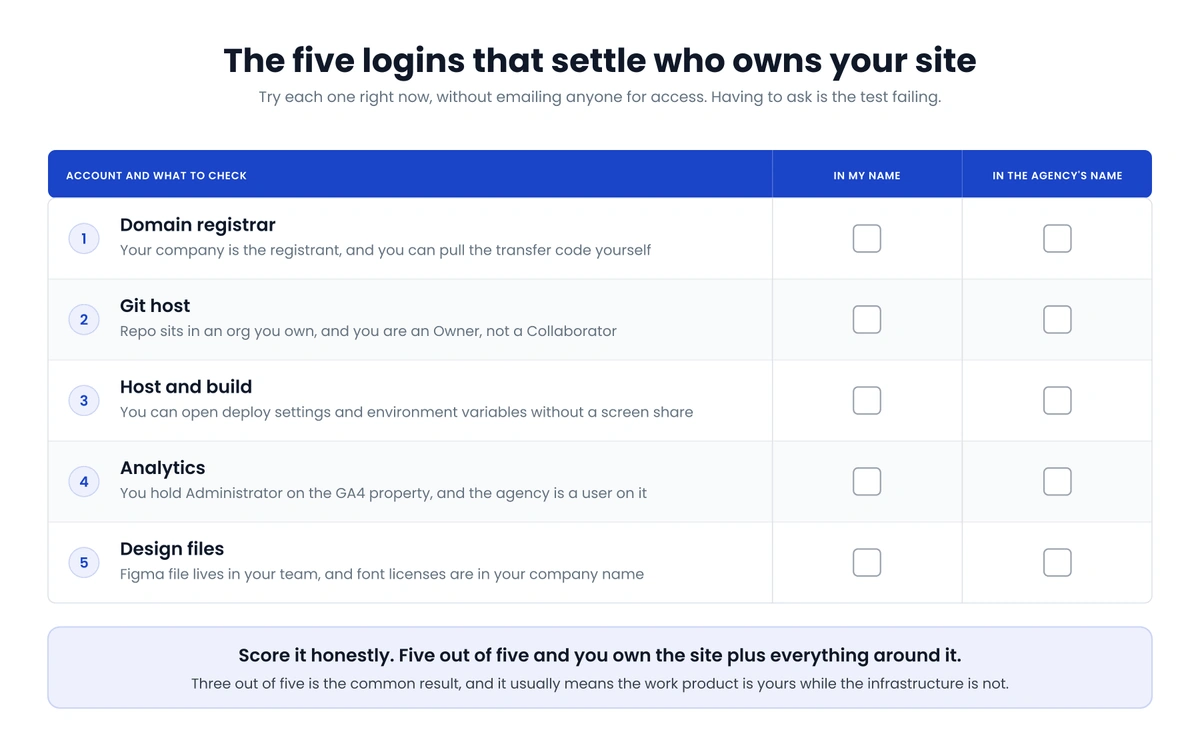
Here is the part that takes the other minute and fifty seconds. Open five tabs and try to log in yourself, right now, without emailing anyone for access. Having to ask is the test failing.
- Domain registrar. Namecheap, Cloudflare, GoDaddy, wherever it lives. You want your company listed as the registrant with your own card on the account, and you want to be able to pull the transfer auth code yourself. If you cannot get in, you do not control the domain, and everything downstream of it is on loan.
- Git host. GitHub, GitLab, or Bitbucket. Two questions here: is the repository inside an organization your company owns, and are you an Owner rather than a Collaborator? GitHub’s own docs draw the line plainly, with owners holding complete administrative access to the organization while outside collaborators get access to specific repositories without belonging to it. An owner can remove a collaborator, and it does not work in the other direction.
- Host and build. Netlify, Vercel, Cloudflare Pages, or whatever server the thing runs on. Is the team account in your name, billed to your card, and can you open the environment variables and deploy settings without a screen share?
- Analytics. Your GA4 property should sit under a Google account you control, with you as Administrator and your agency as a user on it. Google defines the Administrator role as full control of Analytics including adding and removing users, so whoever holds it decides who keeps the traffic history. Reversed, your entire measurement record leaves when they do.
- Design files. The Figma file belongs in your team rather than theirs, and font licenses should be issued in your company name.
Score it honestly. Five out of five and you own the website source code plus everything around it. Three out of five is the common result, and it usually means the work product is yours while the infrastructure is not. That is fixable, though only while everyone still likes each other.
Ran the five-login check and did not like the score? Send us what you found and we will tell you exactly what to ask for, what a move would cost, and whether moving is even worth it this year. Everything we build lands in accounts you own on day one.
Get an Ownership CheckWhat the Law Says About Website Source Code Ownership
Paying for something and owning the copyright to it are separate events under US law, which surprises most founders the first time they hear it. The Copyright Office is direct about this in Circular 30 on works made for hire: a commissioned work created by an independent contractor counts as a work made for hire only if it lands in one of nine narrow categories and there is a signed written agreement saying so. Software written by an outside developer is not on that list. Without an explicit assignment, the person who wrote your website source code owns the copyright to it, invoice paid in full or not.
So “work for hire” language on its own frequently does not get you where you assume it does. What you want is an explicit IP assignment clause moving ownership of the work product to your company on delivery or on payment. Most agency contracts include one, plenty do not, and almost none of them say a word about deploy infrastructure, which is the part that actually strands you. Owning the copyright to code you cannot deploy is a legal win and an operational dead end at the same time.
This is vendor lock-in wearing a different hat. The mechanism is the same whether it shows up in your CRM, your email platform, or your website source code: the thing you pay for gets tangled up with an account you do not hold, and the tangle only becomes visible on the way out.
Where Owning Your Website Source Code Costs More
We are not going to pretend ownership is free.
A Wix or Squarespace subscription in the high twenties a month buys you a support team, automatic security patching, and a runtime nobody on your staff ever has to understand. An owned Astro site on Netlify can cost nothing in hosting and still end up more expensive, because the day a dependency breaks the build you need somebody who can read the error. If you have nobody under contract who can run a build locally, an owned repository becomes a liability, and we would rather say that out loud now than sell you a rebuild you cannot maintain.
Migration is slower than anyone wants it to be, too. Getting a real Wix site into a portable codebase runs into weeks of work, most of it spent prying content out of a platform never designed to let it leave cleanly. Our guide to migrating off Wix walks through what that actually involves, step by step. The math works out over a few years, but the first quarter of it costs more than staying put, and anyone telling you otherwise is selling.
There is one more cost people forget, which is judgment. AI tools now make it trivial to generate a codebase you own on paper and cannot evaluate, and owning website source code you cannot read is its own kind of exposure. We wrote up the specific failure modes in our look at vibe coding security, and the short version is that ownership only pays off when somebody can open the files and tell whether they are any good.
If the Answers Came Back Wrong
Ask for the transfer in writing and be specific, because a vague request gets a vague response. Name all five: owner-level transfer of the repository into an organization you create, admin on the host account or a full export of the deploy configuration, the registrar auth code for the domain, Administrator on the GA4 property, and the Figma files moved into your team. Put a date on it. Most agencies hand everything over without any drama, and the ones sitting on assets are usually doing it out of habit and inertia rather than strategy.
Then get it into the next contract. One clause on who owns the work product, one on what gets handed over within thirty days of termination. That costs nothing to add before you sign and is close to impossible to add after. If you are scoping a rebuild anyway, our website build checklist covers what to specify up front, and the same instinct should shape how you pick the agency in the first place.
One more thing once the handover lands: park the credentials somewhere the company controls instead of a founder’s inbox, which is the single source of truth problem in miniature. Handovers arrive as a flurry of invite emails, and six months later nobody remembers which Gmail account holds the registrar.
The Two-Minute Version
Open the source with Ctrl+U and read the asset URLs to see what built the site. If it is a closed builder, you have your answer. If it builds from files, open your five tabs and count how many you can get into without asking permission. Then decide what to do with the score, keeping in mind that a rebuild you cannot maintain is worse than a rental you can, and that both beat finding out mid vendor breakup that the domain is registered to a freelancer who stopped answering email in 2023.
Frequently Asked Questions
How do I view the website source code of any site?
Press Ctrl+U on Windows or Cmd+Option+U on Mac, or type view-source: in front of the URL, and your browser will show you the raw markup it received. If the page is rendered in JavaScript that view can look almost empty, in which case press F12 and use the Elements panel, which shows the live DOM after scripts have run. Either way you are seeing the output your visitors receive, not the files a developer wrote.
Does viewing the website source code tell me who owns it?
No, and this is the most common mix-up we run into. The source tells you what platform generated the page and often which agency built it, since plenty leave a comment or a tracking script behind, but ownership lives in account permissions rather than in markup. Treat the browser check as the thing that tells you which questions to ask next.
Who owns my website source code if an agency built it?
Your contract decides, and the default under US copyright law favors whoever wrote the code unless there is a signed assignment. “Work for hire” language on its own often does not carry the day when the developer is an outside contractor, so what you want is an explicit IP assignment clause naming your company as the owner of the work product. Even then, check the contract for language about deploy infrastructure and accounts, because that is the gap that strands most businesses.
Can I get the website source code out of Wix or Squarespace?
Not in any usable form. Both let you export some content, blog posts in particular, but the layout, design system, and functionality stay behind because they live inside the platform rather than in files you hold. Leaving either builder means a rebuild, which is worth knowing before you pour another two years of content into one.
What should I ask an agency for during a handover?
Ask for five specific things in writing with a deadline attached: owner-level transfer of the repository into an organization you control, admin access on the hosting account or a full export of the deploy configuration, the registrar auth code for your domain, the Administrator role on your GA4 property, and your design files moved into your Figma team. Vague requests get vague responses, so name each asset and each permission level explicitly.
Is owning my website source code always the right call?
Usually, though not always today. If nobody on your team or under contract can run a build and read an error message, an owned repository sits there as a risk rather than an asset, and a hosted builder may genuinely be the better fit for another year. The right move is to know exactly which situation you are in, then plan the transition deliberately instead of discovering the answer during a vendor breakup.