Wix Alternatives Ranked by What You Actually Own
Almost every roundup of Wix alternatives is a feature grid: templates, SEO tools, ecommerce, page speed, support hours. Those grids are mostly noise now, because the features converged years ago. Every builder on the market in 2026 ships decent templates, a blog, a store, and an AI assistant that will write your headlines for you. The question none of the grids ask is the one that actually decides it: if you left in three years, what could you take with you?
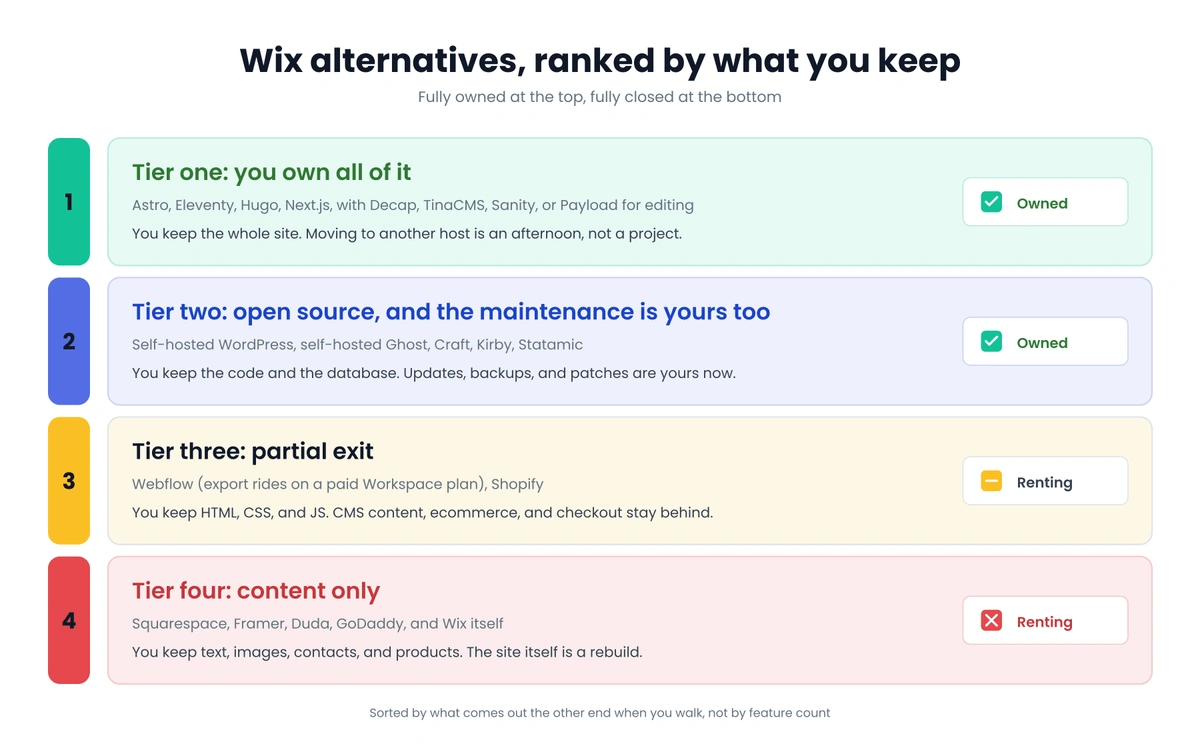
Sorted by features, these platforms look interchangeable. Sorted by what comes out the other end when you walk, they fall into four tiers, and two of those tiers mean you are renting. So this is a ranking of Wix alternatives by ownership, which is close to the only axis that still separates them.
What A Website Is Actually Made Of
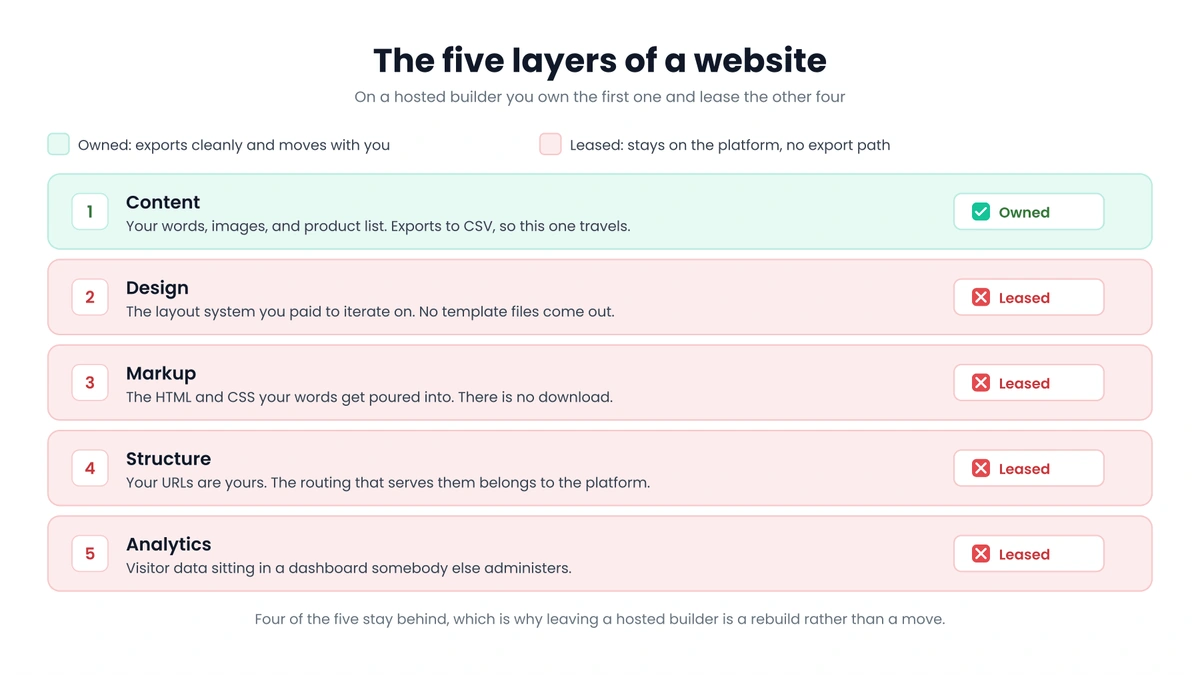
Five things: your content, your design, your markup, your structure, and the data about who visits. On a hosted builder you own the first one and lease the other four. Your words are yours, but the HTML those words get poured into is not, the layout system is not, the URLs are technically yours while the routing that serves them is not, and your analytics live in a dashboard somebody else administers.
That arrangement holds up fine until one of three things happens. The pricing changes, the platform sunsets a feature you built a process around, or you grow into a requirement the builder cannot meet and find out that switching means starting over. The third one carries the real bill. We have quoted rebuilds on 15-page sites that came in higher than the original build did, because nothing from the old site came across and every page had to be designed a second time.
So when a founder asks us for alternatives to Wix, we skip the features and ask what they want to be true in year three. That one question sorts the market faster than any comparison table, and it is the same question sitting underneath vendor lock-in everywhere else in a business.
What You Can Get Out Of Wix Today
Wix deserves credit here, because it is a good product for what it is and it is not hostile about your data. Store products export to CSV, anything you keep in a CMS collection exports to CSV as well, and your domain transfers out once you are past the 60 day lock ICANN puts on newly registered domains. Images come down from the media manager.
The gaps are worth knowing before you plan around them. Wix’s own help center says plainly that exporting blog posts to other platforms is not possible, so a site with three years of posts in the native Wix Blog is looking at copy and paste or a scraper. And there is no HTML download, no CSS, no template files, no supported path to put the thing you designed onto a different host. Wix Studio does hand developers real code hooks through Velo, but that code runs on Wix infrastructure and stays there.
Which means the design work, where most of the money and nearly all of the iteration went, does not travel with you. You leave with a folder of text and images and a rebuild on the calendar. That is the baseline every entry on this list of Wix alternatives gets measured against.
Ranking The Wix Alternatives By What You Keep
Tier One: You Own All Of It
A static site generator, your content in a Git repository, deployed to a host you can swap out whenever you feel like it. Astro is what we build on most often, though Eleventy, Hugo, and Next.js land in the same tier. Content lives as markdown files, design lives as components, and both sit in a repo with your company’s name on it. Deploy to Netlify, Cloudflare Pages, or Vercel, and if one of them annoys you, moving to another is an afternoon rather than a project.
Editing does not have to mean touching code, either. Decap, TinaCMS, Sanity, and Payload all sit on top of this stack and give a non-technical editor a normal admin screen. Hosting is close to free, since Cloudflare states that requests to static assets are free and unlimited on both its free and paid plans, so a marketing site here usually runs somewhere between nothing and about $20 a month. If you want the build-side detail, our 2026 website build checklist walks through what shipping a site you own looks like from the first decision to launch day.
Tier Two: Open Source, And The Maintenance Is Yours Too
Self-hosted WordPress, self-hosted Ghost, Craft, Kirby, and Statamic. The code is yours, the database is yours, and the export path is real rather than theoretical. What you inherit alongside that freedom is a living system, so the updates, the backups, the plugin conflicts, and the security patches all become your problem or your developer’s.
WordPress is simultaneously the most portable CMS in the world, running 41.2% of all websites as of August 2026, and the platform most likely to eat a Tuesday. It earns its keep when you need heavy editorial workflows or one specific plugin nothing else replicates, and it is oversized for a 10-page service business that updates twice a year.
Tier Three: Partial Exit
Webflow gives you a working static export of HTML, CSS, and JavaScript, which is more than almost anyone else in this category offers. Read the fine print on which plan actually buys it, though, because export rides on a paid Workspace plan rather than on a Site plan, and people get caught by that constantly. What the export leaves behind is CMS collection content, ecommerce, and anything depending on Webflow’s own forms or site search, so a blog-heavy or store-heavy Webflow site comes out as a well-built shell you still have to refill by hand. Shopify works the same way in spirit: products import and export as CSV, your theme is Liquid you can read and adapt, and checkout belongs to Shopify permanently.
Partial exit beats no exit, and for plenty of businesses it is enough. It belongs in its own category rather than filed under ownership, though, because the half you cannot take with you is usually the half that took longest to build.
Tier Four: Content Only
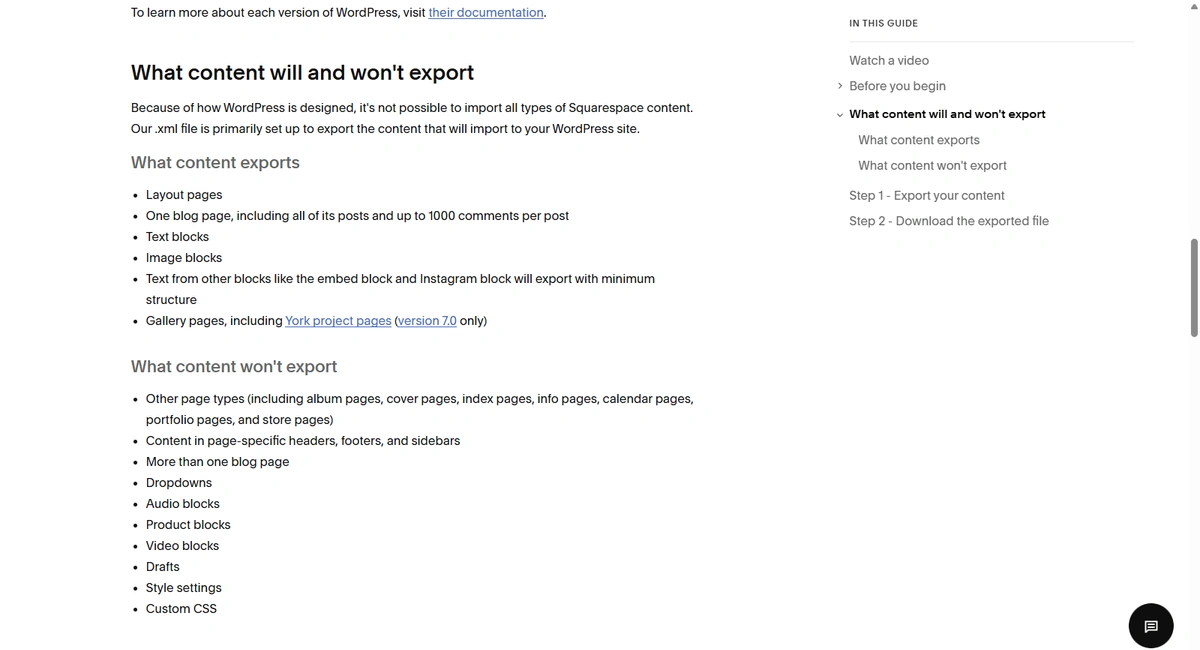
Squarespace, Framer, Duda, GoDaddy, and Wix itself. You get your text, your images, your contacts, and your product list, and you do not get the site. We wrote up what moves and what doesn’t when you export a Squarespace site, and the shape of it repeats across this whole tier. If you are here and you decide to move, the plan is a rebuild, so the only decision left is whether you rebuild into tier one or into another tier four platform and restart the same clock.
Why The Reddit Threads About Wix Alternatives Never Resolve
Search Wix alternatives on Reddit and you get a thread that argues in circles for 200 comments and lands nowhere. Half the replies come from people optimizing for how fast they can launch, and for that goal Squarespace or Framer is a completely correct answer. The other half come from people who got burned on a migration and now refuse to recommend anything they cannot put in a repository. Both groups are right about their own priority, and neither one ever states which priority they are arguing from, so the thread reads like a disagreement about products when it is really a disagreement about time horizons.
Pick your horizon first and the list of Wix alternatives shortens on its own, usually to two or three real candidates.
Where Owning It Costs You More
Ownership is slower and more expensive at the start, and anyone selling it as a pure upgrade is leaving the invoice off the slide.
A five-page Wix site can be live in a weekend for the price of a template and a domain, built by the owner with no developer involved anywhere. The tier one equivalent is a build. A small business migration off Wix usually runs a few weeks and lands in the low five figures depending on page count and how much content needs cleaning up, and it needs somebody who can ship a codebase. There is no drag-and-drop canvas, so layout changes go through a person or through whatever CMS layer you put on top. And when something breaks at 11pm, in place of a support chat you have your host’s status page and your developer’s phone number.
Ownership pays off across years, which means day one always looks like a bad trade. If your site is a brochure that will look the same in 2029 and you are a solo operator with no plans to hire, Wix is a defensible choice and you should keep your money. If your site is a lead engine you iterate on, if you are spending real budget driving traffic to it, or if a rebuild three years from now would genuinely hurt, then paying more up front to skip the rebuild tax is the cheaper road. Once the site produces revenue you would miss, the arithmetic has already flipped whether or not anyone has run the numbers. That gap between what founders are sold and what they end up holding is most of why we built lilAgents the way we did.
Want to know what you could actually walk away with right now? Send us your current site and we will tell you plainly what exports, what doesn't, and what a move would realistically cost. No retainer required, and anything we build for you belongs to you on day one.
Get a Free Ownership AuditA Ten-Minute Test Before You Commit To Anything
Run this on any of the Wix alternatives you are evaluating, before you sign up rather than after. Find the export documentation, not the marketing page, and read exactly what the export produces. You are looking for one thing: whether design and markup come with it, or whether it is a content dump wearing an export button. Then check four more:
- Domain: Is it registered to your company, with your billing card on it?
- Analytics: Does the data come out in a format you could load somewhere else?
- Repository: If code exists at all, does the repo sit in your organization or your agency’s?
- Media: Can you pull the whole library in bulk, or is it one file at a time?
Content-only answers are not automatically a bad deal. They mean you are renting, and rentals should be priced and planned like rentals. Keeping those answers written down somewhere your team can find them is part of running a single source of truth instead of rediscovering all of it in the middle of a migration.
Picking Between Wix Alternatives Without Overthinking It
You can run the tier framework yourself without ever talking to us. Pull up whatever platform you are considering, find its export docs, put it in a tier, and match that tier against your horizon. That will tell you more than any comparison table on the internet.
If you land on tier one and want a second opinion on whether the timing works for your business, or you want somebody to look at your current setup and say plainly what you could walk away with today, that is a conversation we have most weeks. Sometimes the answer is stay put another year, and we say so when it is. If you have already decided to leave, our guide on how to migrate from Wix covers the mechanics of getting the content across without wrecking your rankings.
Frequently Asked Questions
What Are The Best Wix Alternatives For A Small Business Without A Developer?
Squarespace and Framer are the closest like-for-like swaps and will feel familiar inside an hour, so if launch speed is the priority they are honest answers. If you want to move up a tier without hiring anyone full time, an Astro site with a CMS layer like TinaCMS or Decap gives you a normal editing screen while the site itself lives in a repository you own. You need someone to build it once, and you do not need them for daily edits after that.
Are There Cheaper Wix Alternatives, Or Free Ones?
Yes, and the cheap end gets very cheap. Cloudflare Pages, Netlify, and GitHub Pages all have free tiers that comfortably host a static marketing site, which leaves the domain at roughly $12 to $20 a year as your only hard recurring cost. WordPress.com and a handful of builders offer free tiers too, though those generally come with platform branding and a subdomain attached. On the free path the cost moves into the build rather than disappearing.
Can I Move My Wix Site To WordPress Or Astro Without Rebuilding It?
Not the design. Content comes across in bulk for anything living in a CMS collection or a store, since those export as CSV and can be scripted into markdown or a WordPress import, while native Wix Blog posts have to be pulled out by hand. The pages themselves get rebuilt, which is why we treat a Wix migration as a redesign with a content transfer attached rather than a lift and shift.
Does Leaving Wix Hurt My SEO?
It does not have to, and a careful move usually helps, because static sites are fast and you get full control of your markup, schema, and redirects. What hurts is a sloppy migration: changed URLs with no redirect map, meta descriptions dropped in transit, internal links pointing at pages that no longer exist. Map every existing URL to its new destination before launch, keep the page titles and content intact, and rankings generally hold through the switch.
Which Wix Alternatives Actually Let Me Export My Design?
Webflow is the one to know among hosted builders, since a paid Workspace plan produces a static export of your HTML, CSS, and JavaScript, though CMS and ecommerce content stay behind. Check the plan type before you pay, because a Site plan on its own does not include export no matter how much it costs. Everything in tier one exports by definition, because the design already lives in your repository as component and template files rather than inside a proprietary editor. The rest of the hosted market gives you content and nothing else, so plan for a rebuild if you choose one.
Should I Switch Off Wix At All?
Only if the horizon justifies it. A brochure site for a solo operator that will look roughly the same in three years is a fine use of Wix, and spending five figures to own something that never changes is a waste of your money. Once the site is a real revenue channel that you iterate on, or once a forced rebuild would set you back a quarter, moving to a platform you own becomes the cheaper option over any reasonable timeframe.