
2026 Website Build Checklist: Ship a Site You Actually Own
Most guides to building a website stop at the homepage and a contact form. They skip the part that decides whether your site is fast, findable, readable by AI, and actually yours: the files nobody mentions, the config nobody walks you through, and the handful of architectural choices that determine whether you can ever leave your host.
This is that part. It’s a website build checklist for 2026 written from the builder’s chair, covering the obvious pages quickly and then spending real time on the things that fall through the cracks. The opinionated stack underneath it is Astro for the framework, GitHub for the repository, and Netlify for hosting, recommended today and swappable by design, because the whole point is to build something you can pick up and move whenever you want.
We build sites this way for clients, so treat the recommendations as biased toward what we’d ship. This website build checklist works on any modern static stack.
Start With a Foundation You Can Carry
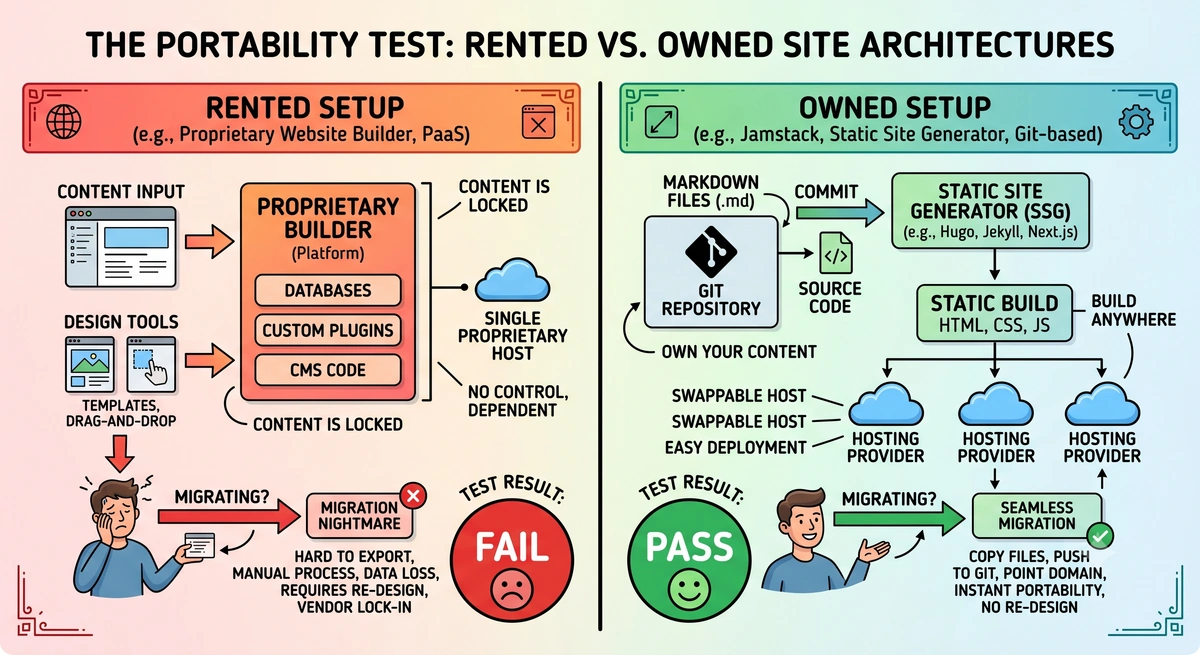
Before a single page exists, the stack you pick determines whether you own the result. The test is simple: could you move this entire site to a different host in an afternoon? If the answer is no, you’re renting, and the lease can end on someone else’s terms. We wrote a whole piece on what vendor lock-in actually is and how to avoid it, and it starts here, at the foundation.
A portable foundation has three properties. Your content lives as plain files in a repository you control, usually markdown. Your site builds to static HTML, CSS, and JavaScript that any host on earth can serve. And your framework adds capability without trapping your content inside a proprietary database. Astro hits all three, which is why we reach for it, but the principle matters more than the tool. The businesses that get stuck are the ones whose content only exists inside a builder’s editor. The ones that stay free keep everything as files. If you’re coming from a builder, our guide on how to migrate from Wix and take everything with you shows what that move looks like in practice, and what a Squarespace export actually leaves behind covers the same ground for Squarespace.
There’s a newer wrinkle worth naming: the tools building your site have opinions, and they aren’t always your opinions. AI app builders like Replit and Lovable default to React and Vite and lean hard on that stack whether or not it fits your project. AI coding assistants, this one included, tend to reach for Vercel when you ask where to deploy, even when Netlify or Cloudflare Pages would serve you better. And the ground keeps shifting underneath all of it: Cloudflare acquired Astro, which may change where an Astro site most naturally wants to live a year from now. None of that means you should avoid these tools. It means you should decide what you’re building and where it should live before you start, so you’re directing the tools rather than inheriting whatever default they reach for. The default is where lock-in sneaks back in.
Three more setup decisions belong here:
Domain and DNS. Register your domain somewhere you control, and keep the registrar separate from your host. Cloudflare sells domains at cost with no markup, which is the cheapest path, though its dashboard assumes you know what you’re doing. Namecheap costs slightly more and is far friendlier for non-technical owners. Either is fine. The rule that matters is that the domain registration sits in an account with your name on it, independent of whoever builds or hosts the site, so you can repoint it anywhere.
The deploy pipeline. Connect your GitHub repository to Netlify and let every push deploy automatically. Static hosting runs free at this scale, you get version history and one-click rollback for free, and your netlify.toml holds the build command, the publish directory, and your URL conventions as readable, version-controlled config. Nothing about this setup is locked to Netlify. Point the same repository at a different host and you’re live again.
Email on your own domain. Set up branded email at your domain (you@yourbusiness.com) instead of a generic Gmail address, and authenticate it so it actually lands in inboxes. That means adding SPF, DKIM, and DMARC records to your DNS, the three checks mailbox providers run to decide whether your mail is real. Almost nobody outside deliverability circles configures all three, so getting them right is both a trust signal and an edge most competitors skip. The ownership logic matches the domain itself: your email lives on a domain you control, so you can switch providers later without changing your address.
The Pages Everyone Builds
These are table stakes, so move fast and get them right:
- A homepage that says what you do in the first screen, with a clear next action.
- An about page with real names and faces, which both humans and AI models use to establish trust.
- Services or product pages, one focused page per offering rather than one crowded page for all of them.
- A contact page or section with a clickable phone number (
tel:) and email (mailto:). Plain-text phone numbers cost you calls from the majority of visitors who are on a phone. - A contact form that actually goes somewhere. A form that loses submissions without anyone noticing is worse than no form at all, so wire it to a real handler (on our stack, Netlify Forms captures every entry and can email you the moment one arrives), show the visitor a clear confirmation, and send yourself a notification so a lead never sits unseen. Test it end to end before launch, because this is one of the most common and most expensive things to get wrong.
- A thank-you page for the form to land on. Some forms just show an in-place success message, which is fine, but on a simpler site without advanced analytics a dedicated
/thank-youpage is the easiest way to measure conversions, since a visit to it is a completed lead you can mark as a goal. Pass a bit of context to it in the URL, like the form source or what the visitor selected, so you can tell which form and which path produced the lead. - If the business books or sells online, wire the real platform in directly, whether that is a Toast ordering link, a Calendly or scheduling embed, or a booking widget the client already uses. Deep-link or embed it, put it behind a simple feature flag so you can ship the site before the account is fully live, and give multi-location businesses a quick picker so the button lands them in the right place.
- Make the primary action impossible to miss on mobile: a click-to-call
tel:link with the non-digits stripped out, plus a persistent or floating call-to-action so the next step is always one tap away. - Social proof you can verify: testimonials that link to the real, third-party source (your Google Business Profile, Clutch, G2, or wherever the review actually lives), rather than unattributed quotes a visitor has to take on faith. Linked, third-party reviews earn trust with humans and give AI tools a citation trail back to your reputation. For sites with steady review flow, pulling those reviews at build time (merging new ones in, and failing gracefully if the API is down) keeps the proof fresh without a third-party widget slowing the page.
- The utility and legal pages a real business needs: a privacy policy and terms of service at minimum, plus an accessibility statement. A cookie notice is only required if you actually set cookies that demand disclosure, which usually comes down to your analytics choice.
None of these are where sites go wrong. The next section is.
The Files Everyone Forgets
This is the heart of the website build checklist, the layer that separates a real site from a pretty brochure. Each item here is small, most take minutes, and almost every site we audit is missing several.
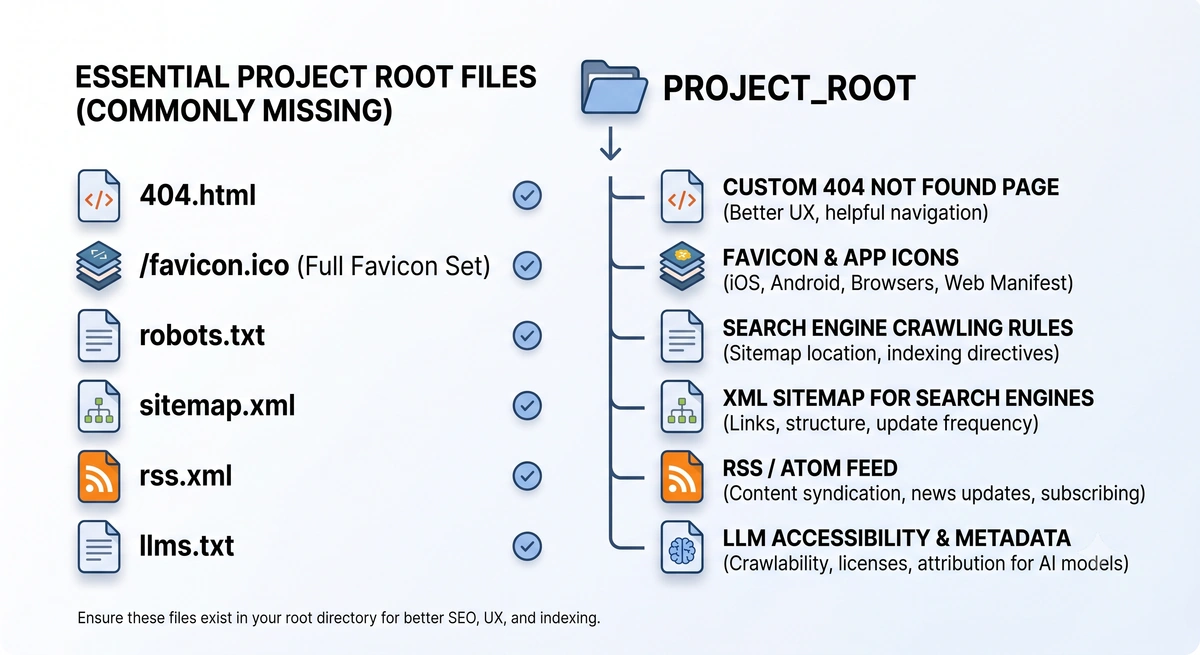
A real 404 page. Build a styled 404 that matches your site and offers a way back home, and make sure your host returns an actual 404 status code rather than a soft 200. On a static host you wire this with a catch-all rule so unmatched URLs serve your 404 page with the right status. A good 404 turns a dead end into a recovery.
The full favicon set, not just one icon. A complete set covers favicon.ico, 16 and 32 pixel PNGs, a 180 pixel apple-touch-icon, 192 and 512 pixel Android icons, an SVG favicon, and a web app manifest that ties them together. A nice touch we ship is a favicon that swaps between light and dark versions based on the visitor’s color scheme. It’s a small detail that signals the rest of the build was done with the same care.
A generated robots.txt with explicit AI rules. Your robots.txt should make deliberate decisions about AI crawlers like GPTBot, ClaudeBot, PerplexityBot, and Google-Extended rather than leaving them to chance, and it should declare a Content-Signal directive that states your policy on search, AI input, and AI training. End it with a pointer to your sitemap. Generating this file from code instead of hand-editing a static text file means it stays correct as your policy evolves.
An accurate sitemap.xml. Every important page belongs in your sitemap, and nothing else does. Admin pages, thank-you pages, and abandoned drafts waste crawl budget and dilute the attention search engines give you. Generate it from your real content so it never drifts, and reference it from robots.txt. One small gotcha: some sitemap tooling outputs sitemap-index.xml by default, which surprises both crawlers and the people who type /sitemap.xml out of habit, so serve it at that conventional path and 301 the old name if your generator used it.
An RSS feed. Generate a feed from your content collection so readers, aggregators, and other tools can subscribe. It costs nothing once your content is structured and it keeps your site interoperable with the open web.
An llms.txt file. This is the emerging standard for telling AI tools what your site is, who you are, and where the important pages live. Pair it with an llms-full.txt that concatenates your key reference content into one document an agent can read in a single fetch. Both are plain text generated from content you already have.
Get the Head Tags Right
The contents of your <head> decide how every page looks in search results and when shared. The pattern that scales is universal defaults with per-page overrides.
Set a default title pattern and description once, then let each page override them from its own frontmatter. Keep titles near 60 characters and descriptions near 155, because that’s roughly what search engines display before they cut off the rest, and the part that disappears is usually the part that earns the click. Give every page a canonical URL and pick one trailing-slash convention for the whole site, then hold to it. One trap here stays invisible until an SEO audit: the site URL in your config has to be the canonical host, the one visitors actually land on. If your site redirects www to the apex domain but your config still says www, then your canonical tags, sitemap, OG URLs, and RSS all advertise the redirecting version. Set the config to the destination host and confirm it with a quick header check.
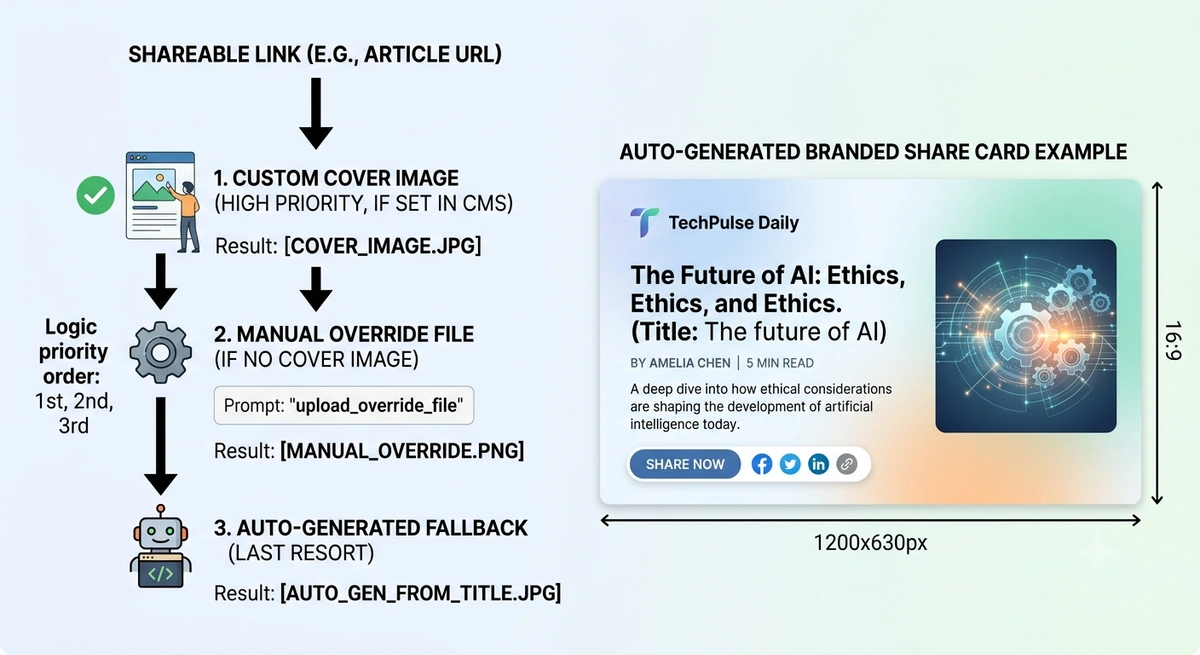
For sharing, every page needs Open Graph and Twitter card tags: title, description, image, URL, type, and site name, with og:type set to article for posts and website for everything else. The detail most builds skip is the image, and the fix is to make it automatic. Set up a resolution order so each page picks the best share image on its own: use the page’s cover image if it has one, fall back to a manually placed override file if you dropped one in, and otherwise generate a branded image on the spot from the page’s title. That last fallback is the one that earns its keep, because it means a page with no cover image still gets a clean, on-brand share card instead of a blank or broken preview.
We render those generated images at build time at 1200 by 630 from the title using a local image library, with no external service in the loop. Because the generator is your own code, restyling is a one-line change: bump a template version and every image regenerates on the next build, while a content-hash cache skips the ones that didn’t change so builds stay fast. You can update the look of every share image across the entire site whenever you want, and you own the whole pipeline.
Make Your Content Legible to Machines
Two audiences read your site now, and only one of them is human. Search engines and AI assistants need structure, and giving it to them is mostly mechanical.
Structured data (JSON-LD). Add an Organization or LocalBusiness block sitewide so engines know what your business is, then add per-page schema where it fits: BlogPosting on articles, BreadcrumbList for navigation, FAQPage on any page with a question-and-answer section, and Review or AggregateRating on pages that show testimonials. The clean way to handle this is to build the schema object in code and inject it per page, which also lets you derive it from content you already wrote. We auto-extract FAQ schema straight from the markdown of a post’s FAQ section, so the structured data can never fall out of sync with the visible content. Validate everything against Google’s Rich Results Test before you ship.
If you are building for a local business, the Organization block is where most of the value hides, so go deep. Use LocalBusiness, or a specific type like Restaurant, with the name, address, and phone matching your Google Business Profile exactly, plus geo coordinates, your hours in schema.org format, a price range, and the areas you serve. If the business has more than one location, emit one node per location instead of a single vague block, and reference the parent business by its @id rather than duplicating it. One detail we learned the hard way: do not assert opening hours for a location that has not opened yet, or the engines will happily tell people you are open when you are not.
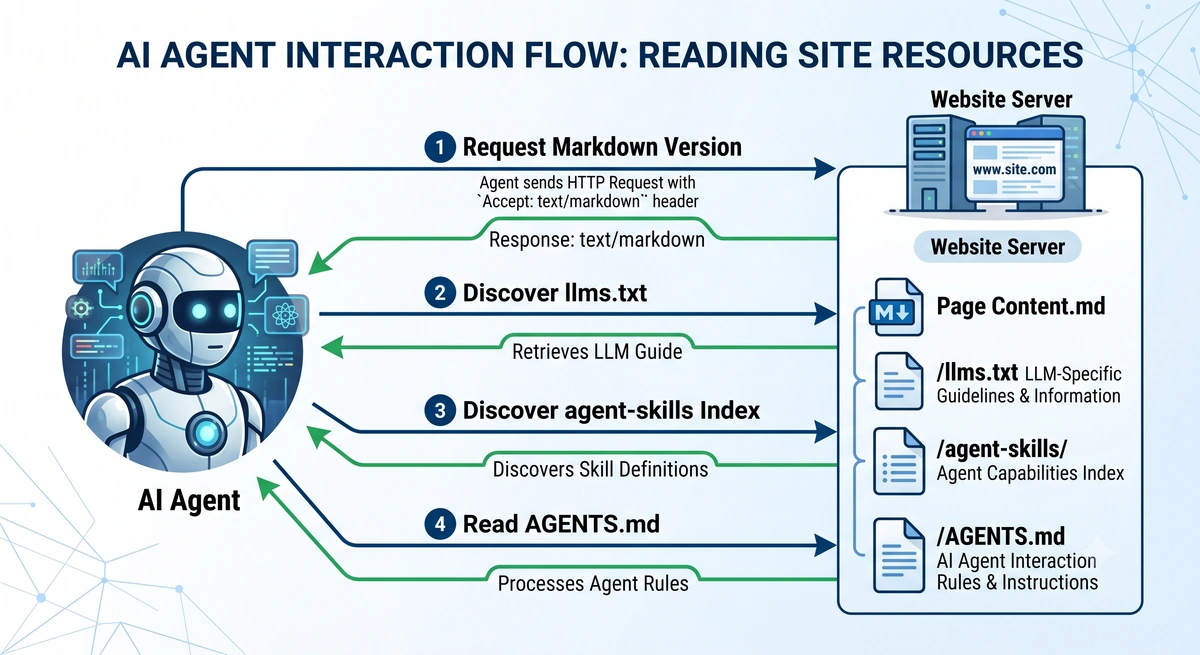
AI agent readability. This is the frontier layer, and most sites score one or two out of eight on the basics. When we ran our study of how the Fortune 500 scores on AI agent readiness, not one of the five hundred largest US companies passed more than five of eight universal checks. The bar is low, which means shipping these now puts you ahead of companies with vastly larger budgets. The core moves: write semantic HTML with real <button> and <a> elements so agents can parse your interface, serve a clean markdown version of any page to clients that ask for it, publish an agent-skills index and an AGENTS.md at predictable locations, and advertise those resources with Link headers so an agent discovers them from any URL. Once the foundations are in place, our practitioner guide to generative engine optimization covers how to actually earn citations in ChatGPT, Perplexity, and Google’s AI Overviews.
Link Everything, Orphan Nothing
A page no other page links to is a page search engines barely see and visitors never find. Internal linking is how a site holds together, and it’s where dynamic content tends to break if you don’t plan for it.
Link generously between related pages using descriptive anchor text, so “our website audit process” instead of “click here.” Give blog posts a related-posts section driven by shared tags or direct links. Most important, make sure dynamic content cannot fall through the cracks: route your posts and projects from a content collection, give every collection a listing page and tag pages, and you guarantee that every entry has a path to it and a reasonable fallback if something is missing.
One trap to design around from the start: a live page should never link to a page that isn’t published yet. We handle this with an authoring convention where a cross-link to an unpublished post lives as an invisible comment until that post goes live, so a draft link can never ship by accident. Whichever way you solve it, do it deliberately, because broken internal links are both a dead end for customers and a signal to search engines that the site isn’t maintained. The same logic applies to your navigation: filter out any menu item whose destination is still a draft, so the nav never points at a page that 404s in production.
One small thing on outbound links: a plain target="_blank" is the right default for opening external links in a new tab, and you do not need to bolt rel="noopener noreferrer" onto every one of them, since modern browsers already apply that protection to new-tab links on their own. Reserve rel attributes for the specific case where you have a reason, like adding rel="nofollow" to a link you are citing but do not want to endorse or pass ranking signal to. Adding them everywhere by default is cargo-cult advice that clutters your markup for no real benefit.
Build an Image Pipeline and Hit Your Core Web Vitals
Images are the heaviest thing on most pages and the easiest place to wreck your load times. The fix is a build-time pipeline rather than whatever the editor happened to upload.
Convert images to a modern format like WebP at build time, cap their dimensions to something sane for the web, and compress them with intent. Lazy-load images by default so they only fetch as the visitor scrolls. The exception worth knowing is your largest above-the-fold image, usually a hero: load that one eagerly with high fetch priority so it paints fast, because it’s almost always your Largest Contentful Paint and lazy-loading it would slow the metric that matters most. Require alt text on every meaningful image. We enforce it in our content schema so a build fails without it, which makes the accessibility and SEO win automatic rather than optional. Go one step further with responsive image sets: generate each image at a few widths and let the browser pick the right one with srcset and sizes, so a phone never downloads a desktop-sized file. It takes real work to wire up, but on image-heavy pages it is the difference between a fast site and a slow one on mobile.
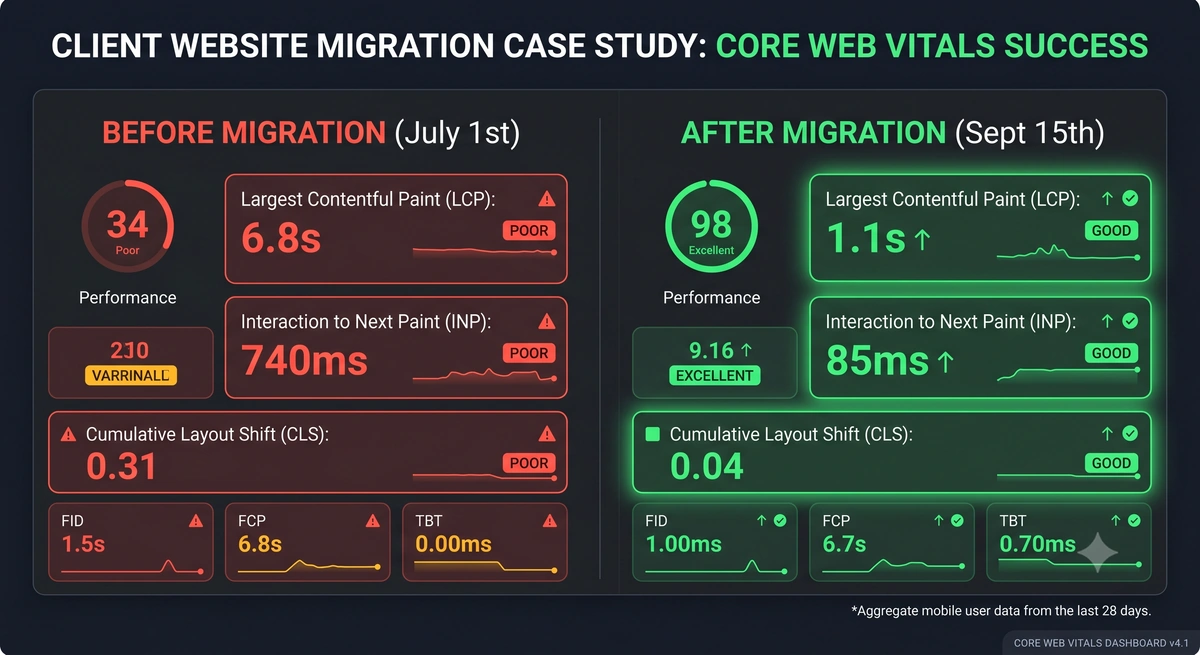
All of this image work has a scoreboard, and it is worth naming the numbers. Google’s Core Web Vitals are the thresholds it measures on real visitors: Largest Contentful Paint under 2.5 seconds, Interaction to Next Paint under 200 milliseconds, and Cumulative Layout Shift under 0.1. Optimized images and an eager hero move LCP, reserving space for images and embeds keeps CLS down, and trimming the JavaScript you ship protects INP. Test against real mobile rather than your fast desktop connection, because that is where these scores are won or lost.
Fonts deserve the same intent as images, because a careless font setup is a common source of layout shift. Pick a strategy and stick to it: preconnect to the font host, request a single variable font covering the weight range you actually use rather than a stack of separate weight files, and set font-display: swap so text appears immediately. For the fastest first paint, preload the hero image with fetchpriority="high", and make sure that preload points at the exact transformed file you render, or the browser downloads it twice.
Define a Design System Before You Build Components
The cheapest time to lock in visual consistency is before the first component exists. Set up a small design-token layer as CSS custom properties: your brand and neutral colors, a spacing scale, font stacks, border radii, and transition timings, all defined once at the root. Build a basic button and utility set on top of those tokens, and have every component reference the variables instead of hard-coded values. You do not need a framework for any of this. The payoff is that a rebrand or a spacing change becomes a one-line edit that updates the whole site, rather than a find-and-replace across dozens of files.
Make It Accessible to Everyone
Accessibility is no longer optional polish. It is a legal expectation across much of the US and EU, it overlaps almost entirely with the semantic HTML and alt text you are already doing for AI readability, and it widens the audience that can actually use your site. A portable, well-structured build gets you most of the way for free.
This part of the website build checklist is short and concrete. Make sure text has enough contrast against its background to stay readable. Confirm every interactive element is reachable and operable by keyboard alone, with a visible focus state so people can see where they are. Pair every form input with a real <label>, and use proper heading order so a screen reader can move through the page like a table of contents. Add a skip-to-content link as the first focusable element so keyboard users can jump past the navigation straight to the main content. Give meaningful images descriptive alt text and decorative ones an empty alt, which you are already enforcing if your image schema requires it. Then test it: tab through the whole page without a mouse, and run a free audit like Lighthouse or axe to catch what the eye misses. Aim for WCAG 2.2 AA, the standard most accessibility laws point to.
Cover the Security Basics
A static site on a modern host removes whole categories of risk, but a few basics on the website build checklist still need a deliberate check. Force HTTPS so every request redirects to the secure version, and turn on HSTS so browsers refuse to load the insecure one at all. On most static hosts the certificate is free and automatic, so this is a matter of confirming it rather than building it. Add a handful of security response headers like X-Frame-Options and X-Content-Type-Options, and a Content-Security-Policy once you know which third-party scripts you actually load. Protect any form from spam with a honeypot field or your host’s built-in form handling, since a contact form with no protection fills up with junk within days. None of this is heavy work on a static stack, which is part of the point: the architecture does most of the hardening for you. Lock down a Permissions-Policy so the browser blocks features you do not use, like camera, microphone, and geolocation. And if you run a CMS with a preview pane, a site-wide X-Frame-Options: DENY will break that preview, so scope a SAMEORIGIN override to just the admin path instead of loosening it everywhere.
Make Content Easy to Write
If publishing is painful, it stops happening, so the authoring experience is part of the build and a real line on the website build checklist. The goal is plug-and-play markdown that a non-developer can write without touching code.
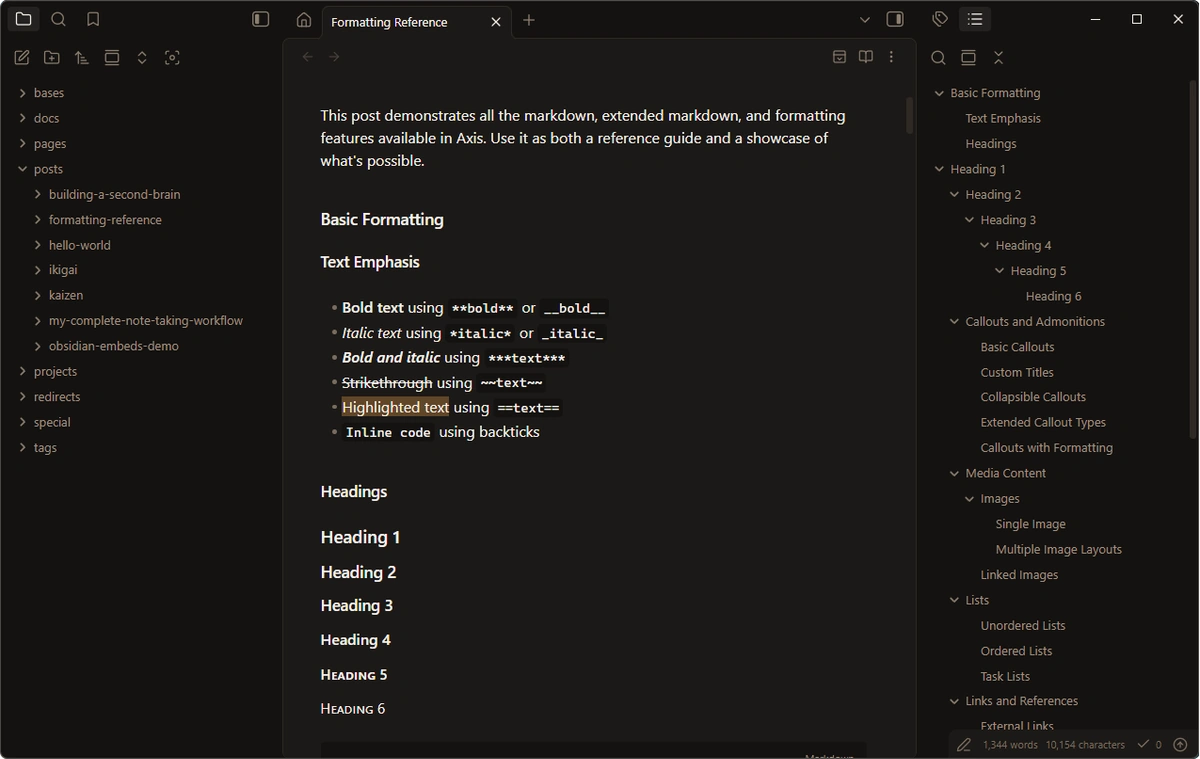
Define your content in typed collections so every post has a validated set of frontmatter fields and a bad post fails loudly at build time instead of breaking once it’s live. Let authors write in plain markdown, and add a small set of one-line markers that expand at build time, so dropping [!cta] on its own line renders a full call-to-action card pulled from the post’s frontmatter, and a quote marker renders a styled pull-quote. We author posts in Obsidian pointed straight at the repository, which turns a familiar markdown editor into the entire content management system, with no database and nothing to lock the content away. This is what “markdown-friendly blog when the site calls for it” looks like in practice, and it keeps the content as portable as the rest of the site.
Two things make this work for non-technical clients. Layer a web-based CMS over the same files, like Sveltia with a GitHub backend at /admin, so a client edits in a friendly interface while a power user can still work in Obsidian, and both write to the same markdown. And mind one gotcha: if the CMS lets clients upload non-image files like PDFs, add a build step that copies them into the output, because the image pipeline handles images and lets everything else 404. One principle ties it together: every CMS field has to map to something actually rendered, since a field that exists in the data but is hard-coded in the component is a fake control that burns the client the first time they change it and nothing happens.
Write an AGENTS.md So Your Choices Survive
You’ll build and maintain this site with AI coding assistants, and they carry a strong sense of how things “should” be done, which usually means the most common way. Left unguided, an agent will cheerfully swap your deliberate choices back to the mainstream: reach for Vercel, pull in a heavier framework, re-add boilerplate you stripped out, or “fix” a config that was intentional. An AGENTS.md file at the root of your repository is how you get ahead of that. It’s a plain markdown brief that capable coding agents read before they work, and it’s where you record the decisions that go against the grain so future sessions respect them.
Write down the things an agent would otherwise guess wrong. The framework and host you chose, and why, so nobody migrates you off them. Your conventions, like a trailing-slash policy or external links that use a plain target with no rel attributes. The parts of the build that look unusual but are intentional, like a custom image script in place of the framework’s default, or a hand-rolled sitemap endpoint. Every line you add there is a future bug you won’t have to chase down later, after an agent has confidently “improved” something you spent real time getting right. Worth knowing: this AGENTS.md, the instructions for agents editing your code, is a separate file from the one you publish for agents reading your live site, even though they share a name and a purpose. If your team uses more than one AI coding tool, publish the same rules to each tool’s expected location from a single source, so every assistant reads the same decisions instead of inventing its own.
Build, Check, and Deploy With Guardrails
A few process habits keep a project healthy long after launch, and they belong on any website build checklist even though they happen off the page rather than on it. Start every project by upgrading dependencies to current before you write anything, because a starter template ships pinned to whatever was new the day it was generated, and you do not want to begin months behind. Pin your package manager version alongside your Node version so the lockfile is read the same way locally and in CI, and commit the lockfile in the same commit as any change that touched dependencies. Build the site locally and run a type check before every push, since a typed content schema only catches a broken post at build time if you actually run the build. Use per-branch deploy previews so you can click through a change before it reaches the live site. And keep a committed .env.example that documents every secret the project needs, while the real secrets stay gitignored.
Map Your Redirects Before You Migrate
Migrations are where a website build checklist proves its worth. If you are building a brand-new site this section is a quick read, but if you are replacing an existing one, it is the step that protects everything you have already earned. When URLs change, the search ranking and the inbound links attached to the old addresses do not move automatically. You have to carry them across with permanent (301) redirects, one from each old URL to its best new home.
Start by pulling a complete list of your current URLs from your analytics, your sitemap, and Google Search Console, then sort it by traffic and inbound links so the pages that matter most get handled first. Map each old slug to the closest equivalent on the new site, and for pages with no direct match, send visitors to the most relevant parent rather than dumping them on the homepage, which search engines treat as a soft 404. Pay special attention to your highest-traffic pages and any URL with backlinks pointing at it, because those are the ones where a missed redirect shows up as a real drop in visitors. Build the map before launch, not after, and your rankings ride across the move instead of resetting. Our guide to migrating off Wix walks through this in the context of a full platform move.
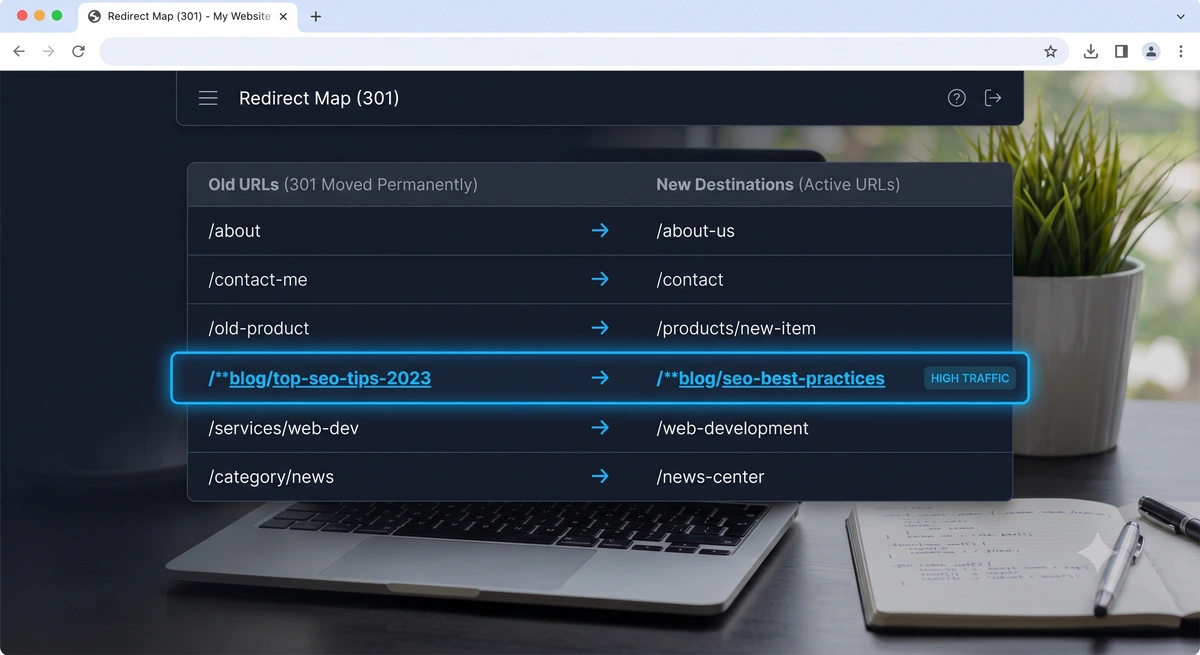
Two host-level redirect rules belong on every site, migration or not. Force a 301 from your host’s default subdomain (the free something.netlify.app style URL) and from www to your single canonical domain, so the duplicate never gets indexed. And mind the order of your rules: specific patterns like /admin/* have to come before broad ones like /*, and the catch-all that serves your 404 has to be the very last rule, or it will swallow everything above it.
See It, and Get Found Fast
Two final layers on the website build checklist make the site measurable and discoverable.
For analytics, pick based on your audience. A privacy-friendly tool like GoatCounter needs no cookie banner and collects no personal data, which keeps the experience clean. GA4 is more powerful if you configure conversions properly and your audience doesn’t mind a consent banner. Microsoft Clarity adds free session recordings and heatmaps on top of either. Your analytics stack is also what decides whether you need the cookie notice from the core-pages list: a fully cookieless setup like GoatCounter on its own usually lets you skip the banner, while GA4, Clarity, and most ad pixels set cookies or store identifiers that legally require disclosure. Just remember that analytics that were set up once and never configured for conversions can’t tell you what actually drives revenue, a problem we unpack in our post on why your site might not be generating leads.
For discovery, verify the site in Google Search Console and Bing Webmaster Tools and submit your sitemap to both, since Bing’s index powers ChatGPT’s web tool. Then ping IndexNow on every build so search engines learn about new content the day it ships instead of weeks later.
Then make sure you are actually tracking what matters. Track your real conversion actions, the quote request, the phone tap, the order or booking click, as explicit events rather than settling for raw pageviews, and confirm they fire correctly in GA4 instead of assuming they do. The simplest reliable conversion signal on a basic site is a dedicated thank-you page: route every successful form submission to it and mark a visit there as a conversion goal, and carry a little context in the URL, like the form source or the service they picked, so you can see which form and which path produced the lead.
From there, widen the net. Install your retargeting pixels, the Meta Pixel and Google Ads tag at minimum, so you can build audiences from visitors and converters and advertise back to them, and fire the same conversion event to those pixels so the platforms can optimize. Pipe the lead into wherever your team actually works, a CRM like HubSpot or an email tool like Mailchimp, ideally through your form handler or a webhook so you stay loosely coupled and can swap tools later. A lead should never dead-end on the site; it should land in your analytics, your ad platforms, and your pipeline at once. And keep the tracking off the main thread where you can, so it never competes with your content for the first paint.
The Portability Test
Run the whole checklist back through one question: if your host vanished tomorrow, how long until you’re live somewhere else? On a build done this way, the answer is an afternoon, because everything is files you own. Your content is markdown. Your images are static files. Your config, your redirects, and your structured data are all readable code in your repository. The host is a convenience, swappable at will, which is exactly the position you want to be in.
That’s the difference between a website you rent and one you own, and every item on this website build checklist ladders up to that one question. The recommended stack is Astro, GitHub, and Netlify today, and it may be something else in a year. That it can change without you losing anything is the entire point. For the owner-facing companion to this build guide, our 2026 small business website checklist covers how to audit a site you already have against the same standards. And if you want to see the payoff, our Gainz and Shreds case study walks through a real migration that landed a 99 out of 100 PageSpeed score and $0 a month in hosting, fully owned.
Writing vs. Building: Vault CMS and an AI Harness
Everything on this list is buildable by hand, but the way we actually work splits it cleanly into two lanes. The writing is yours. Drafting blog posts and page copy in plain markdown, in an Obsidian-as-CMS setup like Vault CMS, keeps the part that needs a human voice fast and fully owned, since every word lands as a file in your repository. The building is where an AI agent harness like Claude Code earns its keep: point it at the technical layer, the config, the schema, the redirects, the dozen small files on this website build checklist, and a correct, working site comes together in a fraction of the time it used to take.
So the division is simple. You write, the agent wires. Vault CMS for the manual craft, the AI harness for everything else.
One rule never moves, though. It is always on you to run pnpm dev, open the local preview, and see the thing working with your own eyes before it goes live. An agent will tell you it is done, and it is usually right, but usually is not the same as shipped. Preview it, click through it, then deploy. That last look is the cheapest insurance you will ever buy, and it is the one step you should never hand off.
The Complete Website Build Checklist
Here’s the entire website build checklist in one place. Copy it, work down it, and check off each item as your site earns it.
Foundation and ownership
- Pick a portable, static-first stack where content lives as files and the site builds to static HTML
- Decide your framework, host, and where things live before you start, so the tooling doesn’t choose for you
- Register your domain in an account you control, kept separate from your host
- Choose a registrar deliberately (Cloudflare at cost, Namecheap friendlier)
- Connect a Git repository to your host for automatic deploys, version history, and one-click rollback
- Pass the portability test: you could move hosts in an afternoon
- Branded email on your domain, authenticated with SPF, DKIM, and DMARC records
Core pages
- Homepage that says what you do above the fold, with a clear next action
- About page with real names and faces
- One focused page per service or product
- Contact section with a clickable phone (
tel:) and email (mailto:) - Contact form wired to a real handler (Netlify Forms in our case) with an email notification and a visible confirmation, tested end to end
- Booking or ordering wired to the client’s real platform (Toast, Calendly, or whatever they use), feature-flagged, with a location picker if needed
- A click-to-call
tel:link and a persistent or floating primary CTA on mobile - A thank-you page (or in-place success state) used as a conversion goal, with form source/context passed in the URL
- Testimonials that link to real, third-party-validated reviews (Google Business Profile, Clutch, G2), not unattributed quotes
- Optional: reviews pulled at build time, merged not overwritten, with a graceful fallback
- Legal and utility pages: privacy policy, terms of service, accessibility statement (cookie notice only if you set cookies that require disclosure)
The files most builds forget
- Styled 404 page that returns a real 404 status code
- Full favicon set (
.ico, 16/32 PNG, 180 apple-touch-icon, 192/512 Android, SVG, web manifest) -
robots.txtwith explicit AI crawler rules and a Content-Signal directive - Accurate
sitemap.xmlthat excludes utility pages and is referenced inrobots.txt - Sitemap served at the conventional
/sitemap.xmlpath (301 the oldsitemap-index.xmlif your generator used it) - RSS feed generated from your content
-
llms.txtandllms-full.txtdescribing your site for AI tools
Head tags and sharing
- Universal default title and description, overridable per page
- Titles near 60 characters, descriptions near 155
- Canonical URL on every page, one consistent trailing-slash convention
- The site config URL set to the canonical host (the one visitors land on after redirects)
- Open Graph and Twitter card tags on every page
- OG image resolution order: cover image, then a manual override file, then auto-generated from the title
- A way to restyle and regenerate every OG image at once (template version plus a content-hash cache)
Structured data and AI readability
- Organization or LocalBusiness JSON-LD sitewide
- Per-page schema where it fits: BlogPosting, BreadcrumbList, FAQPage, Review or AggregateRating for testimonials
- For local businesses: full LocalBusiness/Restaurant schema with NAP, geo, hours, price range, and areas served, one node per location
- Validate schema with Google’s Rich Results Test
- Semantic HTML using real buttons and links
- Serve a clean markdown version of any page to agents that request it
- Publish an agent-skills index and a public AGENTS.md, advertised with Link headers
Internal linking
- Link related pages with descriptive anchor text
- A related-posts section driven by shared tags or links
- Collection-driven routing with listing and tag pages so nothing is orphaned
- A convention that prevents live pages from linking to unpublished ones
- Plain
target="_blank"on external links by default, withrelattributes only on links you don’t want to endorse - Navigation that filters out any item pointing at a draft page
Images
- Build-time conversion to WebP, with capped dimensions and intentional compression
- Lazy-load images by default
- Load the above-the-fold hero eagerly with high fetch priority
- Require alt text on every meaningful image
- Responsive image sets (multiple widths via
srcsetandsizes) so phones don’t download desktop-sized files - Hit Core Web Vitals targets: LCP under 2.5s, INP under 200ms, CLS under 0.1, tested on real mobile
- A deliberate font strategy: preconnect, a single variable font,
font-display: swap, and a preloaded hero image
Design system
- A CSS-variable token layer (colors, spacing scale, fonts, radii, transitions) defined once at the root
- A button and utility set built on those tokens and referenced by every component
Accessibility
- Sufficient color contrast for text
- Full keyboard operability with visible focus states
- Every form input paired with a real
<label>, and a logical heading order - Descriptive alt text on meaningful images, empty
alton decorative ones - A skip-to-content link as the first focusable element
- Tested with a keyboard tab-through and a Lighthouse or axe audit, targeting WCAG 2.2 AA
Security basics
- HTTPS forced site-wide, with HSTS enabled
- Security response headers (X-Frame-Options, X-Content-Type-Options, a Content-Security-Policy)
- Spam protection on every form (a honeypot field or host-native form handling)
- A locked-down Permissions-Policy (block camera, microphone, geolocation unless used)
- CMS preview handled with a scoped
SAMEORIGINoverride, not a site-wide frame-loosening
Authoring
- Typed content collections so a bad post fails at build instead of in production
- Plain-markdown authoring with one-line markers for CTAs, quotes, and callouts
- A repo-based editor like Obsidian as the CMS, with no database
- A web CMS (like Sveltia) over the same files for non-technical editors, plus a build step that copies non-image uploads into the output
- Every CMS field maps to rendered UI, with no decorative fields
Protect your decisions
- A root
AGENTS.mdrecording your framework, host, conventions, and intentional quirks so AI sessions don’t revert them - The same rules published to every AI coding tool you use, from a single source
Build and deploy process
- Upgrade dependencies to current at project start, then periodically
- Pin the package manager version and commit the lockfile with every dependency change
- Build locally and run a type check before every push
- Per-branch deploy previews to review changes before they go live
- A committed
.env.exampledocumenting required secrets, with real secrets gitignored
Redirects and migration (only if you’re replacing an existing site)
- Pull a full list of current URLs from analytics, the sitemap, and Search Console
- Map every old slug to its best new destination with a 301, prioritizing high-traffic and linked pages
- Send no-match pages to the closest relevant parent, never a blanket homepage redirect
- Build the redirect map before launch, not after
- Force-301 the host’s default subdomain and
wwwto your one canonical domain - Redirect rules ordered specific-before-broad, with the 404 catch-all last
Measurement and discovery
- Analytics chosen for your audience (GoatCounter, or GA4 configured for conversions), plus Microsoft Clarity
- Verify the site in Google Search Console and Bing Webmaster Tools, and submit your sitemap to both
- Ping IndexNow on every build
- Real conversion actions (quote, call, order, booking) tracked as explicit events and verified to actually fire
- Retargeting pixels installed (Meta Pixel, Google Ads tag), with the conversion event fired to them
- Leads piped into a CRM or email tool (HubSpot, Mailchimp) via the form handler or a webhook, loosely coupled
- Analytics loaded off the main thread so it doesn’t slow first paint
Want a site built this way, every file in your name and $0 a month to host? We build fast, AI-ready websites you own outright, and the first look at what you have now is free. Send us your URL and we'll tell you the top three things to fix.
Get a Free Website AuditFrequently Asked Questions
What should be on a website build checklist in 2026?
A complete website build checklist covers four layers. The foundation is a portable stack where content lives as files and the site builds to static output you can host anywhere. The standard pages are the homepage, about, services, and contact. The technical files are the ones most builds skip: a real 404, a full favicon set, a generated robots.txt with AI bot rules, an accurate sitemap, an RSS feed, and an llms.txt. The discovery layer is structured data, AI agent readability, internal linking, an image pipeline, analytics, and search engine verification. Most guides cover the first two layers and skip the rest, which is where the actual performance lives.
What is the best tech stack for a website you own?
For most business and content sites, a static-first framework like Astro, with content stored as markdown in a GitHub repository and deployed to a host like Netlify, gives you a site you fully own. The defining feature is portability: your content is plain files, your site builds to standard HTML and CSS, and nothing is trapped in a proprietary database. That means you can move hosts whenever you want. Site builders like Wix and Squarespace are faster to start but keep your site inside their platform, which is the tradeoff you feel later if you ever try to leave.
Are AI website builders like Replit and Lovable good for building a site you own?
They’re powerful for moving fast, but they come with strong defaults. Replit and Lovable lean heavily toward React and Vite, and AI coding assistants often default to deploying on Vercel. Those defaults are fine when they match your goals and a problem when you accept them without deciding. The way to use these tools well is to choose your framework, host, and conventions first, then direct the tool to build within them. If you let the tooling choose for you, you can end up married to a stack and a host you never actually picked. Documenting your decisions in an AGENTS.md file keeps future AI sessions from reverting them back to the defaults.
What files do most websites forget to include?
The most commonly missing files are a properly configured robots.txt with explicit AI crawler rules, an accurate sitemap that excludes utility pages, an llms.txt that tells AI tools what the site is, a complete favicon set rather than a single icon, a styled 404 page that returns a real 404 status, and structured data in JSON-LD. Individually each takes minutes to add. Together they make a large difference in how search engines and AI assistants find, read, and rank the site.
How do I make my website readable by AI agents and ChatGPT?
Start with semantic HTML using real buttons and links so agents can parse the interface, then add the discovery files: a robots.txt with explicit AI bot decisions, an llms.txt describing your site, and structured data so engines understand your content. Going further, you can serve a clean markdown version of each page to clients that request it and publish an agent-skills index so agents know what they can do on your site. Most sites score very low on these checks today, so implementing them is one of the highest-impact things you can do for visibility in AI search.
Do I need a cookie consent banner on my website?
Only if your site sets cookies or stores identifiers that legally require disclosure, which usually comes down to your analytics and ad tools. A cookieless tool like GoatCounter collects no personal data and needs no banner, so a simple marketing site can often skip the consent popup entirely. The moment you add GA4, Microsoft Clarity, a Meta or Google ad pixel, or similar, you are setting cookies that privacy laws like GDPR and CCPA expect you to disclose, and a banner becomes the responsible default.
How do I avoid losing SEO when I migrate or redesign my website?
The single most important step is a complete 301 redirect map: every old URL pointed at its closest equivalent on the new site, built before launch rather than after. Pull your current URLs from analytics, your sitemap, and Google Search Console, sort them by traffic and inbound links, and handle the highest-value pages first. Pages with no direct match should redirect to the most relevant parent rather than the homepage, which search engines treat as a soft 404. Done right, the rankings and link equity attached to your old addresses carry across the move instead of resetting.
How do I track form submissions and conversions on a simple website?
The most reliable low-tech approach is a dedicated thank-you page: send every successful form submission to a /thank-you URL and mark a visit to it as a conversion goal in your analytics, so even a basic site gets clean conversion counts. Pass the form source or the visitor’s selections along in the URL so you can see which form and path drove each lead. Layer in your retargeting pixels (Meta, Google Ads) to build audiences and fire the same conversion event, and push the lead into a CRM or email tool through your form handler or a webhook so it lands in your pipeline, not just your inbox.
How long does it take to build a website like this?
A focused small business site built on this stack typically takes one to a few weeks, depending on page count and how much custom design and content is involved. The technical checklist items in this guide add up to a day or two of configuration once, and most of them are reusable across every future project. The longer-tail work is content, design, and any data migration if you’re moving off an existing platform. The payoff is a fast, owned, low-maintenance site that costs little or nothing to host.