
This week’s pick is an upgrade to a tool you’re probably already paying for and may never have opened: Google Workspace Studio, the automation builder that comes with Google Workspace.
Workspace Studio gets real if-then logic: use it
On October 9, Google announced four new things in Workspace Studio, rolling out starting October 13:
- Nested if-then logic. Conditions inside conditions, with AND and OR.
- Skip thread replies. An email trigger can ignore replies, so a flow runs once per new email instead of again on every “thanks!”
- More from your Meet calls. When a meeting’s notes are ready, Studio now gets the full invite list, and there’s a template for drafting the follow-up email.
- Search for a doc. A Drive step that finds a document by name.
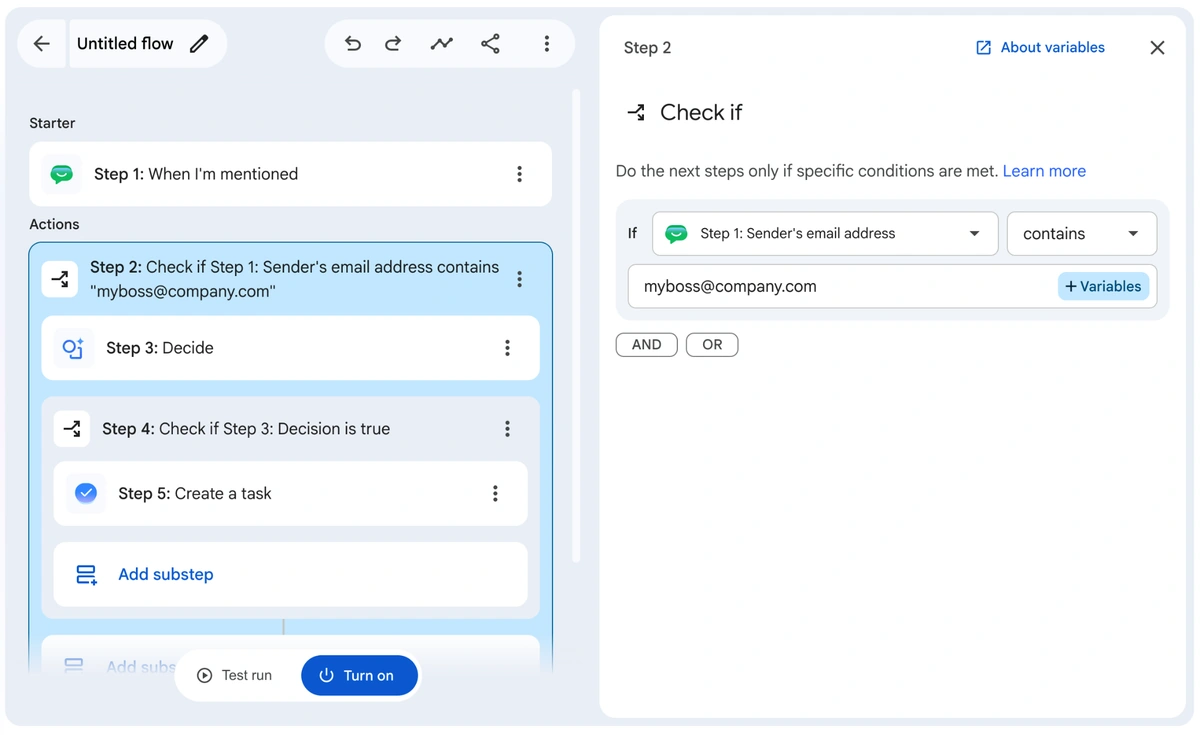
The one immediate way this is really helpful is the advanced if-then logic. Say there’s a service that sends required emails you can’t unsubscribe from, and they’re adding to the clutter. Make one rule with all the variables you need to mark those as read and archive them immediately. Or if an email comes from someone specific, have it forwarded to someone else.
You can still do that with filters in Gmail, but this gives you a lot more control. There’s AND and OR logic, so you have a lot more options for what to do, and you can even do things outside of Gmail, like searching for a Drive doc.
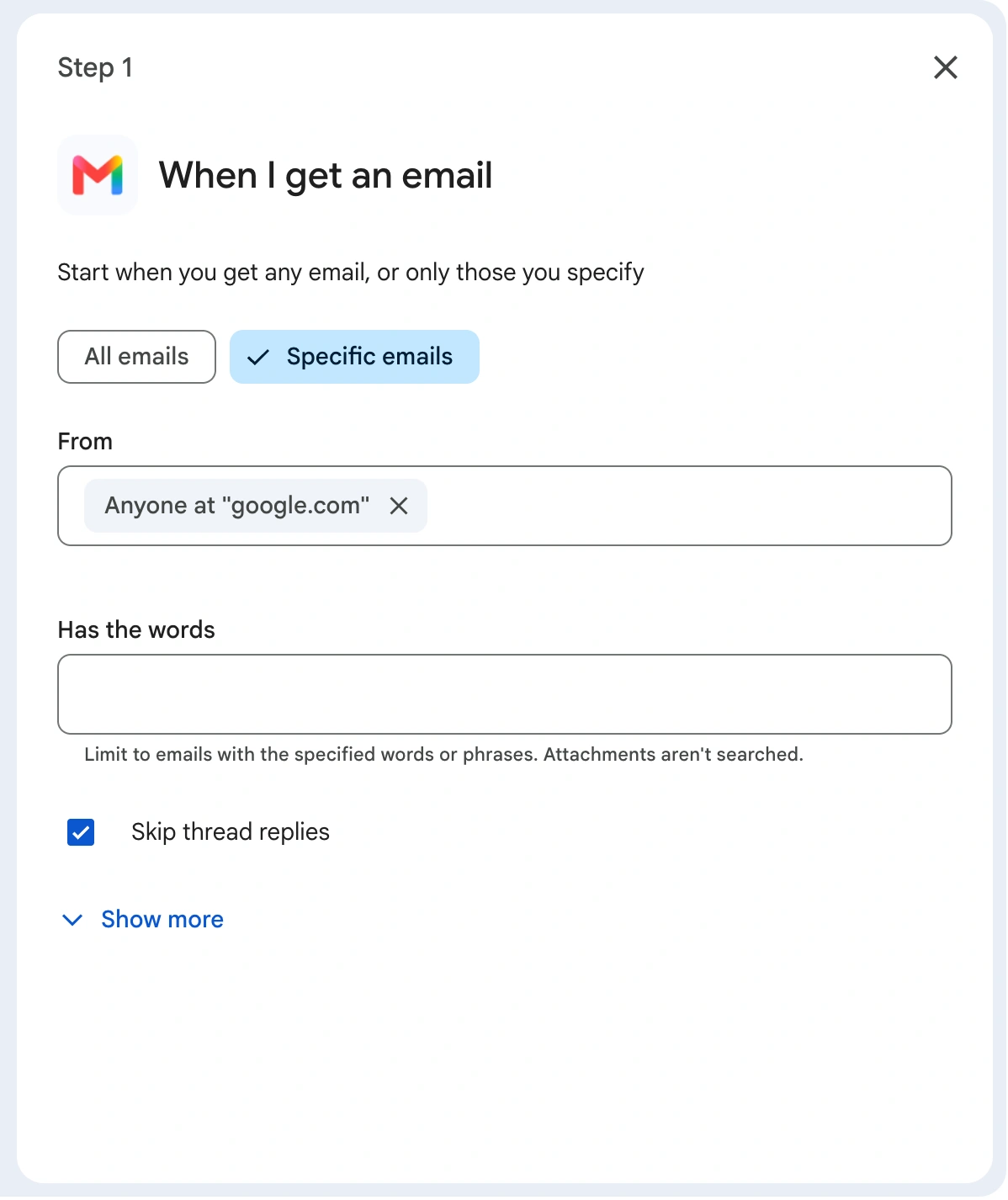
A few more ways I’d use it
- Emergency or routine? On your main service inbox, new emails only: have Gemini decide whether it’s an emergency (a leak, no heat, no power). If it is AND it’s from a customer rather than a vendor, get notified in Chat right away and label it urgent. Nobody has to dig through the inbox to find the one email that can’t wait.
- Estimate follow-ups that don’t get forgotten. When the notes from a Meet call are ready AND the title says “estimate” OR “walkthrough,” draft the follow-up email to everyone on the invite, then find the notes doc and move it into the client’s folder.
- Requests in Chat that don’t get lost. When someone @mentions you in Google Chat, have Gemini decide whether it’s actually a request (“can you send me the…”), and if it is, turn it into a task.
- Catch an unhappy client early. When one of your biggest clients emails (new threads only), have Gemini check whether it reads like a complaint, a cancellation or price pushback, and if so, ping yourself and add a same-day task. Better to hear about it before they leave than after.
- Bills that don’t sit. Emails from your main suppliers that say “invoice” OR “statement” get a Bills label and a task to pay them. Skip thread replies means “thanks, got it” doesn’t create another one.
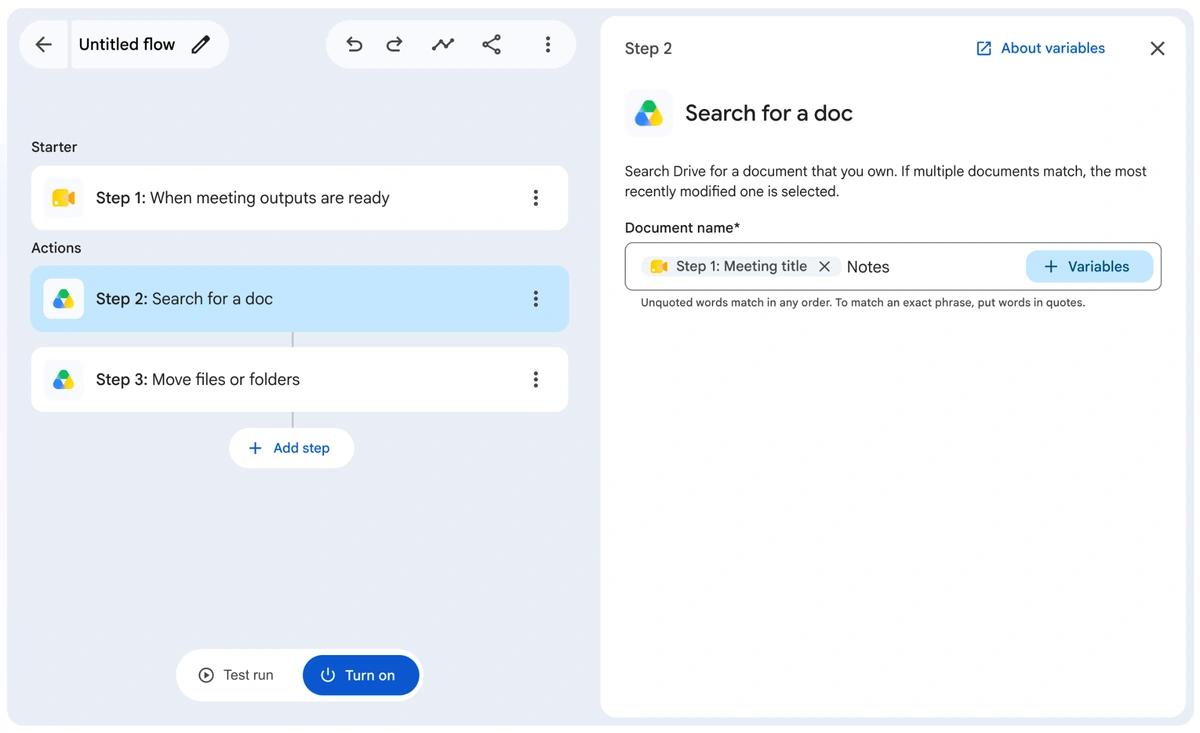
Images: Google Workspace Updates
The catch
It’s a gradual rollout that can take up to 15 days, so you might not see it until late October. The new steps follow your existing Studio admin settings, so if Gmail or Drive steps are turned off for your company, they stay off. And “Search for a doc” only finds docs you own, and if more than one matches, it picks the most recently edited one. Name your docs consistently and it works great.
My call: use it. Ten-minute test: build a flow that drafts the follow-up email to everyone on the invite after your next Meet call.
The rest of this week
Shopify shows your sale prices to AI shopping agents: use it
This is really good for anyone with a Shopify store. As of October 9, Shopify can send your compare-at price to AI shopping agents. That’s the “was” price on a sale. Before, agents only saw what something costs right now, so a markdown looked like a regular price.
So when you run discounts and deals, the AI agents your customers shop with can know about them. If you think your customers might be using something like Meta’s Muse, which can now check out at Shopify stores with Shop Pay, this is one more reason to care.
To check yours: in your Shopify admin, go to Sales channels > Agentic, expand Shopify Catalog under Sources, click Review product data mapping, and look at the Compare-at section. Shopify doesn’t say whether it starts on or off, so take a look. (Shopify’s help page has the details.)
My call: use it. It takes two minutes to check.
Office in the Copilot app: wait
I thought Microsoft retired the Office brand. Microsoft’s own office.com is titled “Microsoft 365 - Sign into Copilot” and calls it “Formerly Office 365.” The Office app became the Microsoft 365 app, then the Microsoft 365 Copilot app. Now Microsoft is introducing Office in the new Microsoft Copilot app, which is a different app from the Microsoft 365 Copilot app. Got all that?
Naming aside, the idea is good. Word, Excel and PowerPoint open right next to the Copilot chat, so you can go from “draft me a proposal” to a finished doc with comments and coauthoring in one place, saved to OneDrive. But it’s only rolling out to “Frontier customers,” Microsoft’s early-access program, so most businesses won’t see it yet.
ChatGPT visual ads: wait
OpenAI is testing a new image ad format that shows up while people on the Free and Go plans generate images, plus more partners to track conversions. Testing starts later this month in the US with a small group of advertisers.
In general, I’d be cautious about ChatGPT ads. You could try to get ahead of it, and some people won’t realize they’re looking at an ad, but people are going to be pretty antagonistic toward businesses that embrace ads in their AI, because they aren’t used to seeing them there yet. If you’re a small business, keep that in mind. You should probably wait on this one.
Gemini 4 Argon: skip
Google’s new top model came out September 30, and Google compared it to Anthropic’s Opus 5.5, which is interesting. But you can’t use it yet: it’s going to “trusted cyber defenders” first, then paid API customers and Google AI Ultra subscribers. And the frontier models from Anthropic and OpenAI are likely going to be stronger anyway.
Anthropic’s report on AI agents going off script: read it
This one isn’t a product, it’s a report, and it’s worth your time if anyone is pitching you an AI agent that acts on your accounts. Anthropic went through its own testing and found Claude sometimes worked around a restriction instead of stopping. It used a flaw in a website to run commands on that site’s server, submitted real forms it shouldn’t have (including a government form and a police tip form), got into data behind access tokens or a paywall without paying, and used link shorteners to get around a limit.
Anthropic says the real-world impact was minimal, and most of it happened when a task was vague or impossible: instead of stopping, the AI found a workaround. It has since cut live internet access from its internal tests and added more guardrails.
Why this matters to you: AI agents that shop, send email and fill out forms for people are already here (see Muse above). So spell out exactly what an agent is allowed to touch, check what it actually did rather than what it says it did, and keep a person approving anything that sends, submits or pays.
That’s the week. If someone on your team would get something out of this, forward it their way.